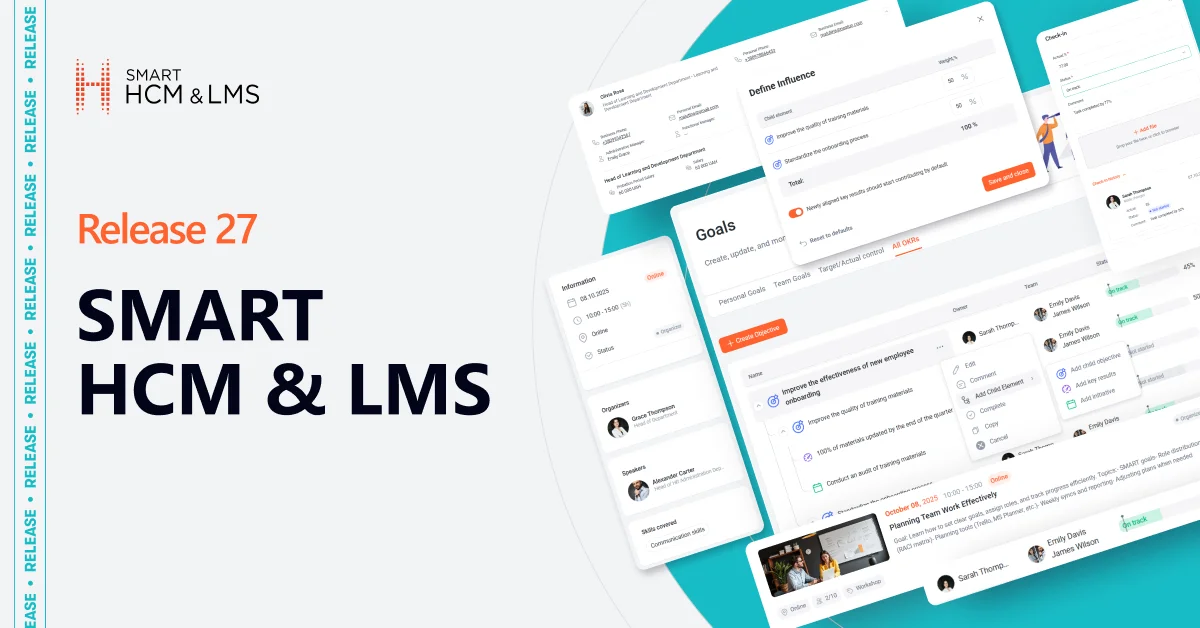
Each new release of SMART HCM & LMS is another step toward a more flexible, automated, and people-centered HR ecosystem.
In Version 27, we focused on making HR teams’ work even faster, data — more transparent, and interactions between managers and employees — even more meaningful.
This update introduces a set of powerful tools that strengthen key stages of the HR cycle — from recruiting to development and performance evaluation: 👩🏻💻
- Integrations with Djinni and Jobsearch.az — open direct access to new talent markets in Ukraine and Azerbaijan. Post vacancies, receive applications, and manage candidate statuses directly in the system — with no duplicate actions or manual updates.
- Intelligent candidate search — find the right specialist in seconds using keywords across the database of resumes, applications, and evaluations.
- OKR in the Self-Service Portal — an updated version of a powerful tool for setting goals, tracking progress, and aligning team and individual results with the company’s strategy.
- Automatic goal completion — a quick way to close the evaluation process in one click, without manual actions or delays.
- 1-on-1 meetings — a new format for transparent communication between a manager and an employee directly in SMART HCM & LMS.
- Enhanced Manager’s Dashboard — now includes up-to-date salary data for administrative subordinates to support prompt and well-informed management decisions.
- Flexible access to corporate events — more personalization, security, and logical access management.
Release 27 brings together innovations that help reduce time spent on routine operations, improve data accuracy, and create a transparent environment for the growth of both people and business.
SMART HCM & LMS continues to evolve as a single platform that connects people, processes, and results — for companies that think strategically and act with agility.
Recruiting Module. Integration of SMART HCM & LMS with Djinni — Ukraine’s Leading IT Job Platform


What’s new?
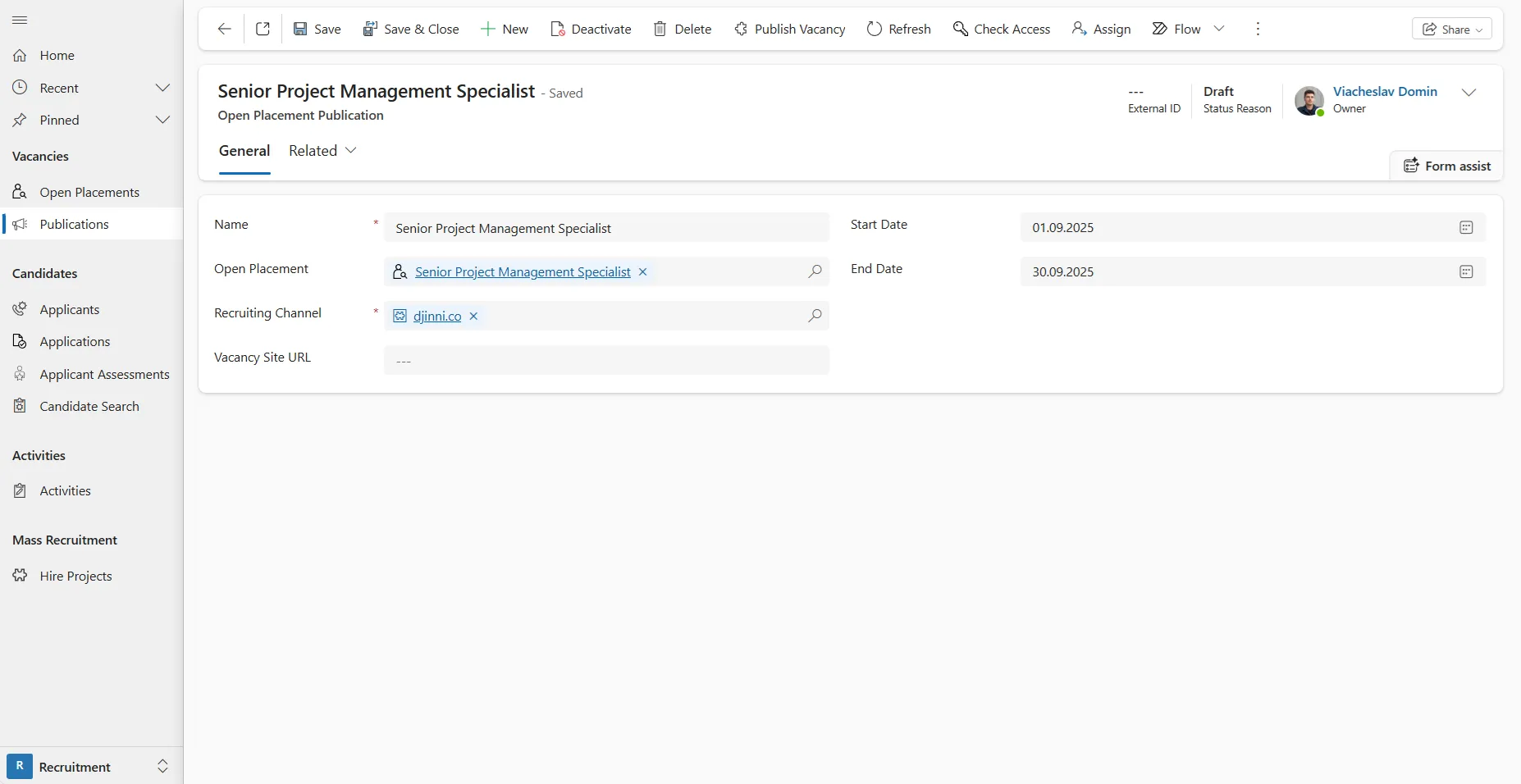
SMART HCM & LMS now features a full integration with Djinni — one of Ukraine’s top job marketplaces for IT professionals, also providing access to the global talent market. The integration enables recruiters to publish job postings, manage publications, and receive candidate responses directly from Djinni.
Now, recruiters can manage Djinni vacancies right inside SMART HCM & LMS — no extra manual steps required.
How it works:
- To launch the integration, an active Djinni account is required. The connection is configured by the SMART HCM & LMS team.
- Job posting.
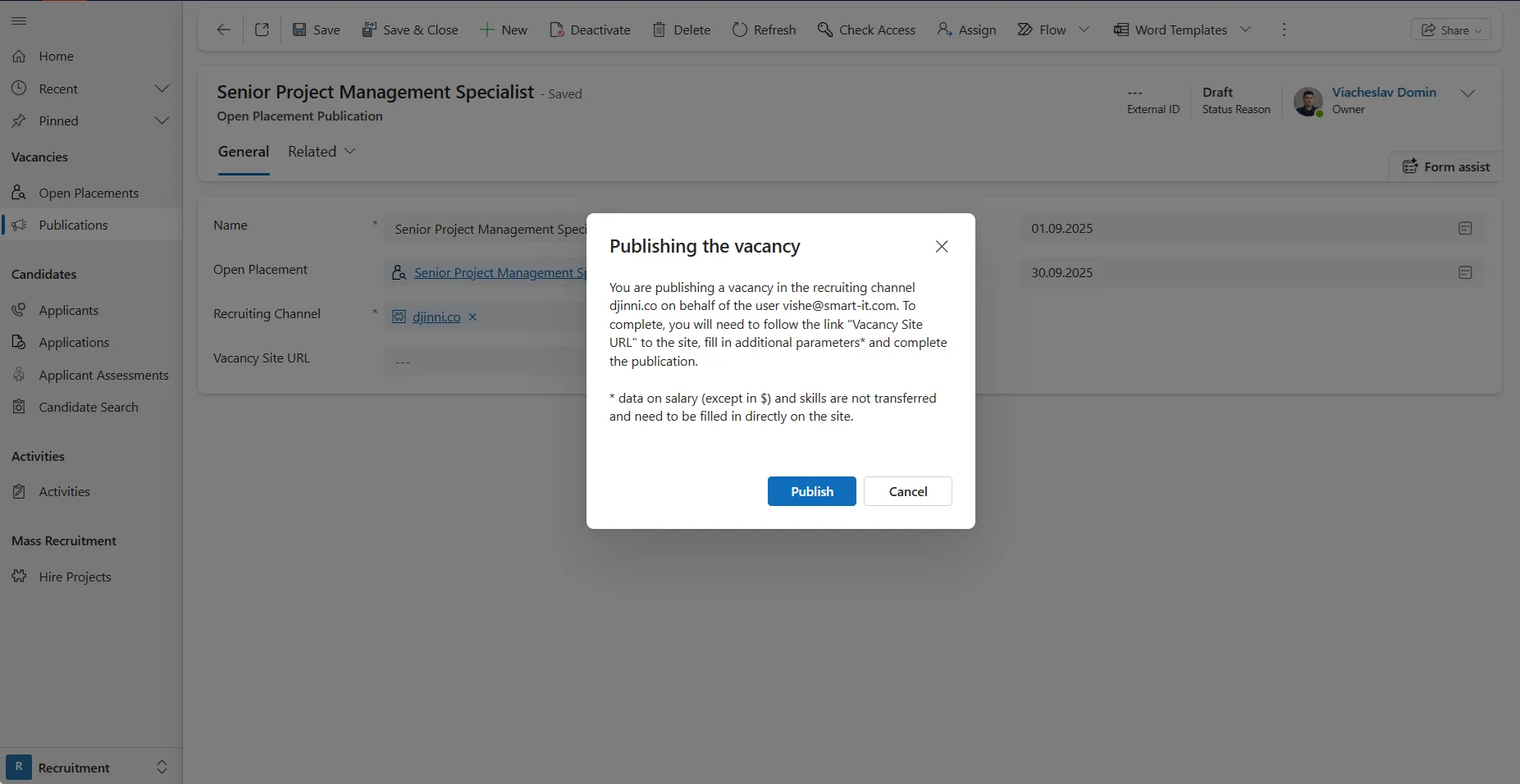
- The recruiter creates a Publication in SMART HCM & LMS (either for a specific vacancy or a mass hiring project), fills in the standard fields, and clicks Publish vacancy.
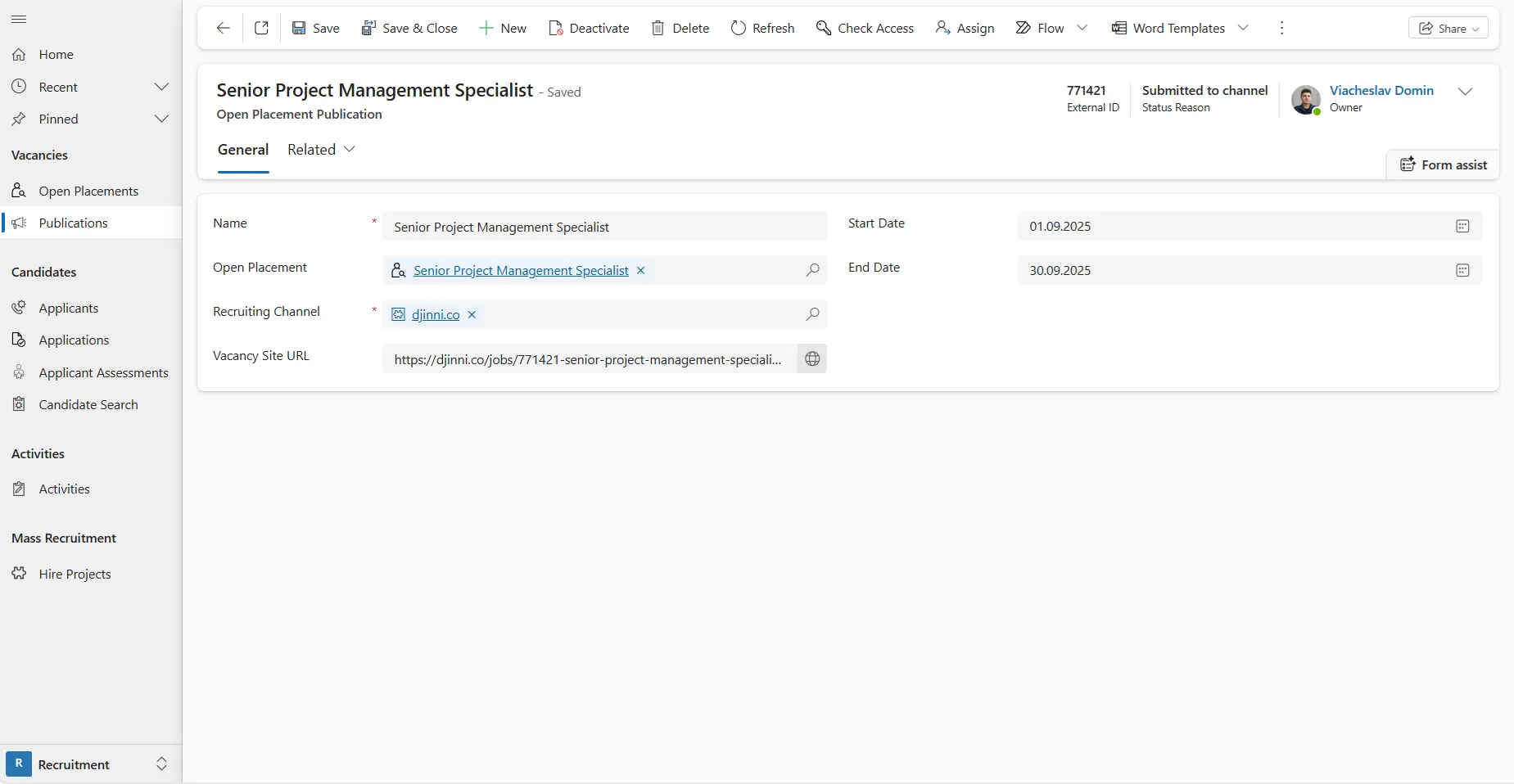
- The system assigns the Publication the status Sent to channel and generates a unique vacancy ID along with a direct link to the posting on Djinni.
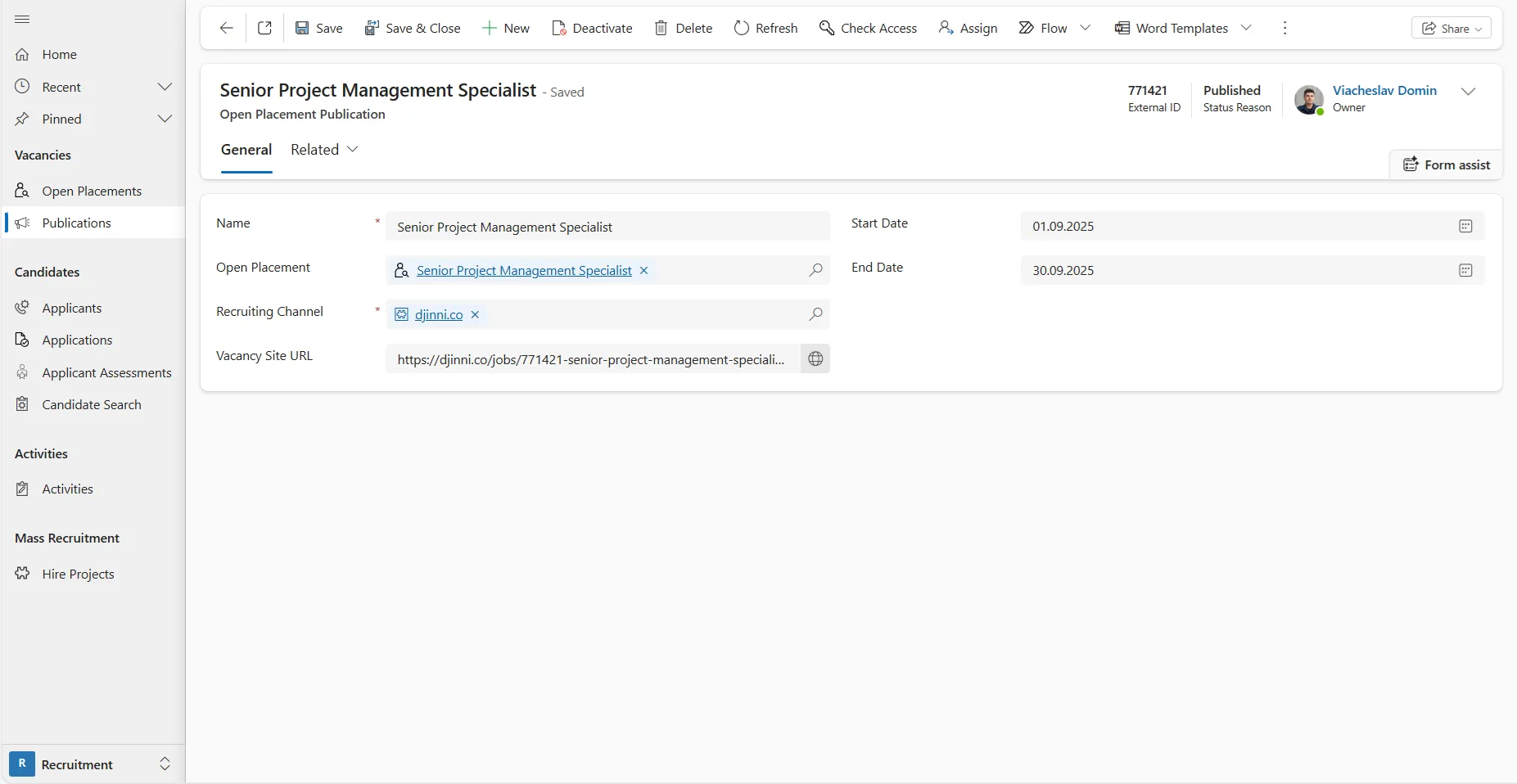
- Using the link, the recruiter can open the Djinni posting, add more details and parameters directly on the site, and then publish it.
- Candidate responses. Djinni allows candidates to apply with or without attaching a resume.
- If no file is attached — the system automatically retrieves candidate information from their Djinni account.
- If a file is attached — the system uses AI-based parsing to extract key candidate details from the resume.
- Status management.
- If a recruiter deactivates a Publication in SMART HCM & LMS, the corresponding vacancy on Djinni will be paused and hidden from potential candidates.
- If a recruiter pauses or deletes a posting on Djinni, it will automatically appear as deactivated/inactive in SMART HCM & LMS.
Who benefits:
- IT recruiters actively searching for tech talent.
- HR teams of international companies looking for specialists both in Ukraine and abroad.
- Companies with high hiring volumes that need centralized management of job postings and candidate responses — without duplicate actions or manual synchronization.
What makes it convenient?
- Centralized publishing: Job postings are published directly from SMART HCM & LMS, with no need to re-enter data.
- Automatic status synchronization: Vacancy statuses are synchronized both ways (SMART HCM & LMS ↔ Djinni).
- Flexible editing: Final edits to a job posting can be made directly on the site — a convenient option for refining details in Djinni’s job builder.
- Flexible candidate data handling: Candidates can apply with or without an attached resume. Even if no file is uploaded, the system automatically pulls data from the candidate’s Djinni profile.
- Data relevance: Status updates from Djinni are refreshed within 1 hour; updates from SMART HCM & LMS appear instantly.
Additional feature options:
- Support for publishing both individual vacancies and mass hiring projects.
- Display of the external vacancy ID and direct link to Djinni within SMART HCM & LMS.
- Integration of statuses into standard SMART HCM & LMS business processes:
- Draft → during creation.
- Sent to channel → after sending job data to Djinni.
- Published → after the vacancy goes live on the site.
- Inactive → in case the vacancy is closed, archived, or deleted.
Why it matters:
Integration with Djinni:
- Enables access to the most up-to-date database of IT professionals without manual resume processing.
- Reduces time-to-hire and ensures a faster, higher-quality recruitment process.
- Provides an automated data flow and minimizes the risk of losing important information.
Recruitment Module. New Opportunities for the Azerbaijani Market: Integration of SMART HCM & LMS with Jobsearch.az
What’s new?
SMART HCM & LMS has been integrated with Jobsearch.az — Azerbaijan’s leading job portal, operating since 2005 and serving as one of the country’s most popular job search platforms.
SMART HCM & LMS has long partnered with Azerbaijani companies, and this integration became a natural next step. Now, our Customers can directly publish vacancies and receive applications from the local site — without leaving the system.
Unlike most other job portals, Jobsearch.az provides a single account per company, administered by the site’s representatives. This means that all job posting requests are sent for verification to Jobsearch.az moderators, and only after approval does the vacancy become visible to candidates.
How it works:
- To start the integration, you need to obtain access credentials from Jobsearch.az representatives. The integration setup is performed by the SMART HCM & LMS team.
- Publishing vacancies.
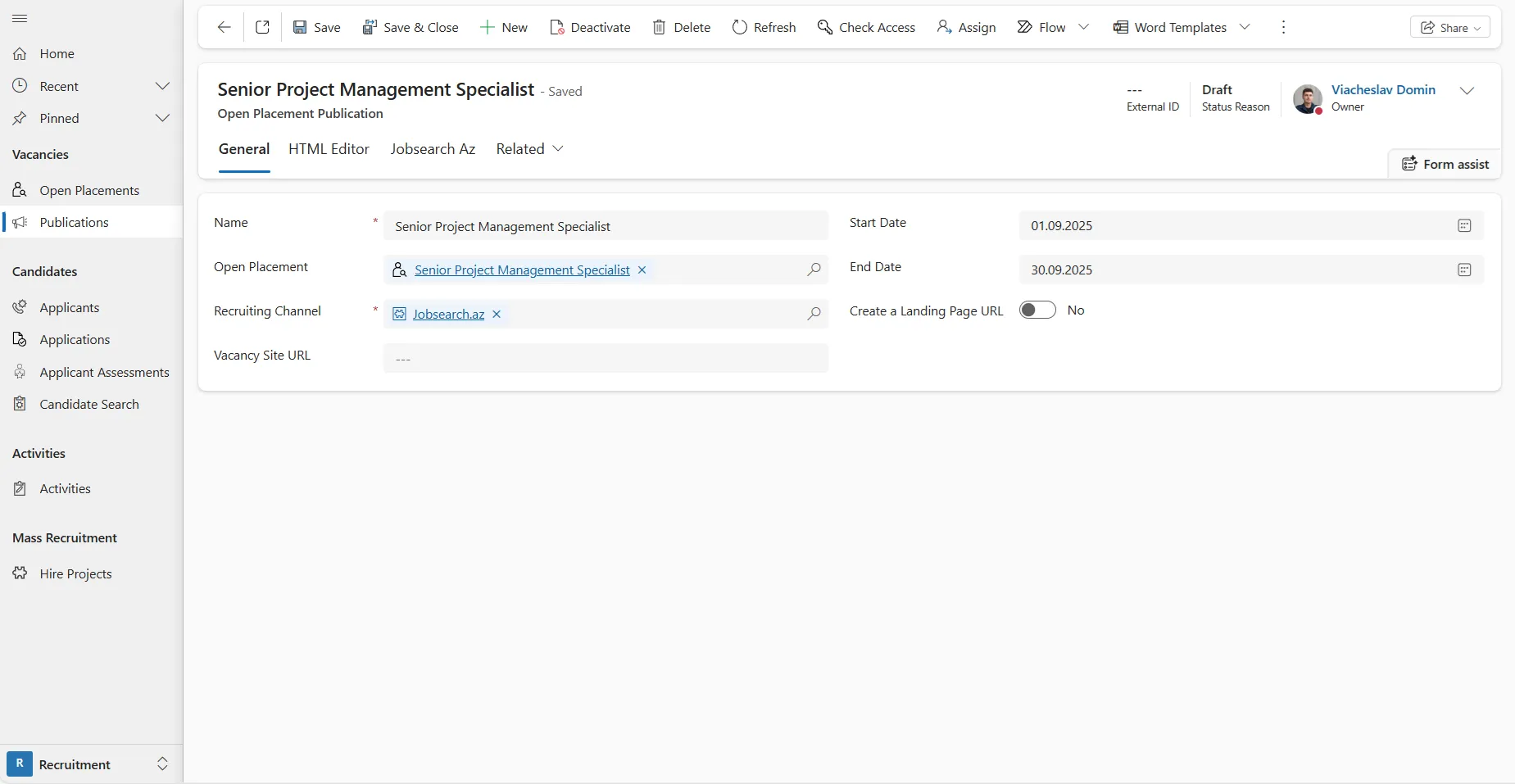
- The recruiter creates a Publication in SMART HCM & LMS (for a single vacancy or a mass hiring project).
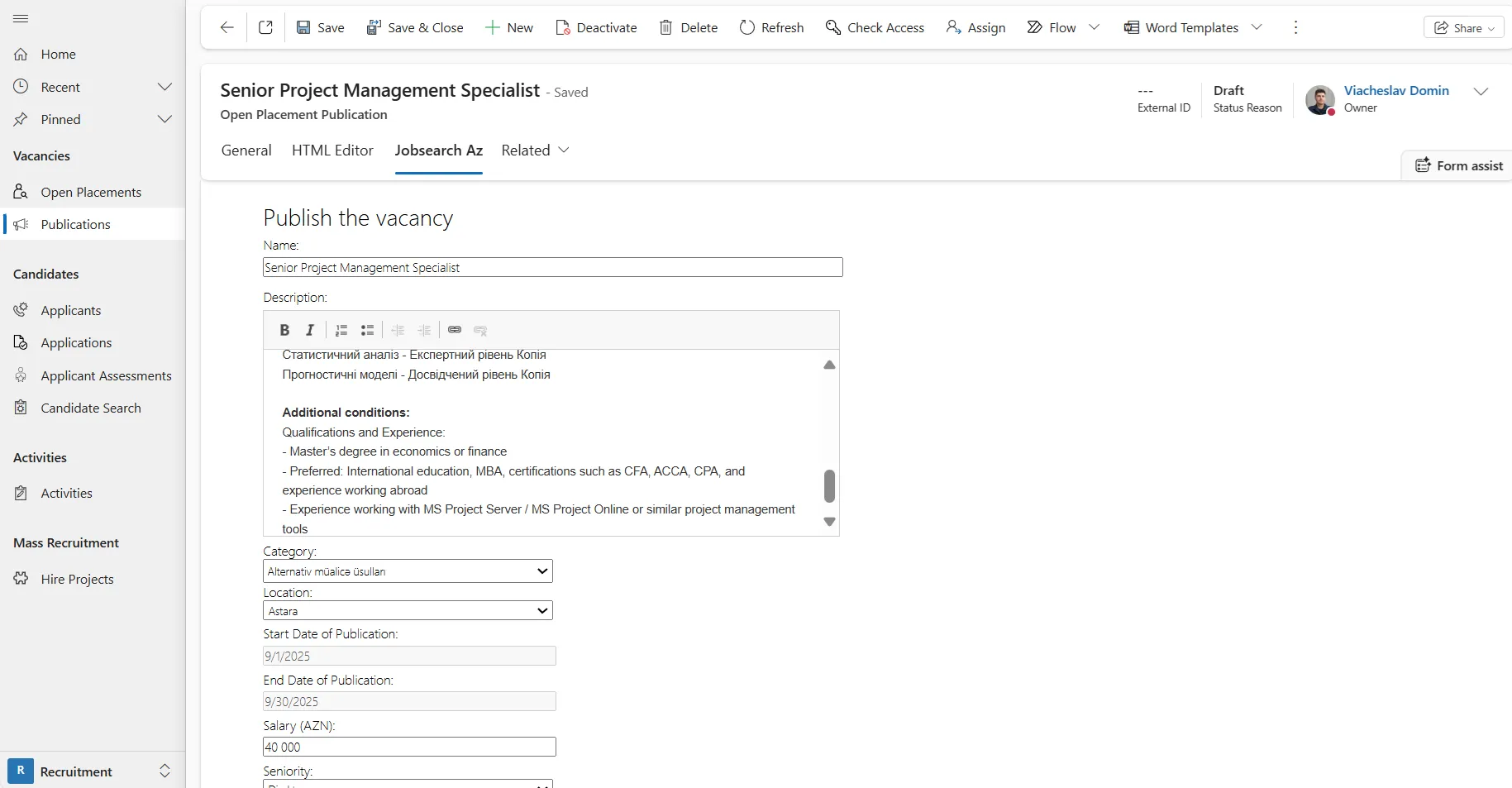
- On the Jobsearch.az tab, they edit the vacancy description using the built-in job builder and fill in the required fields.
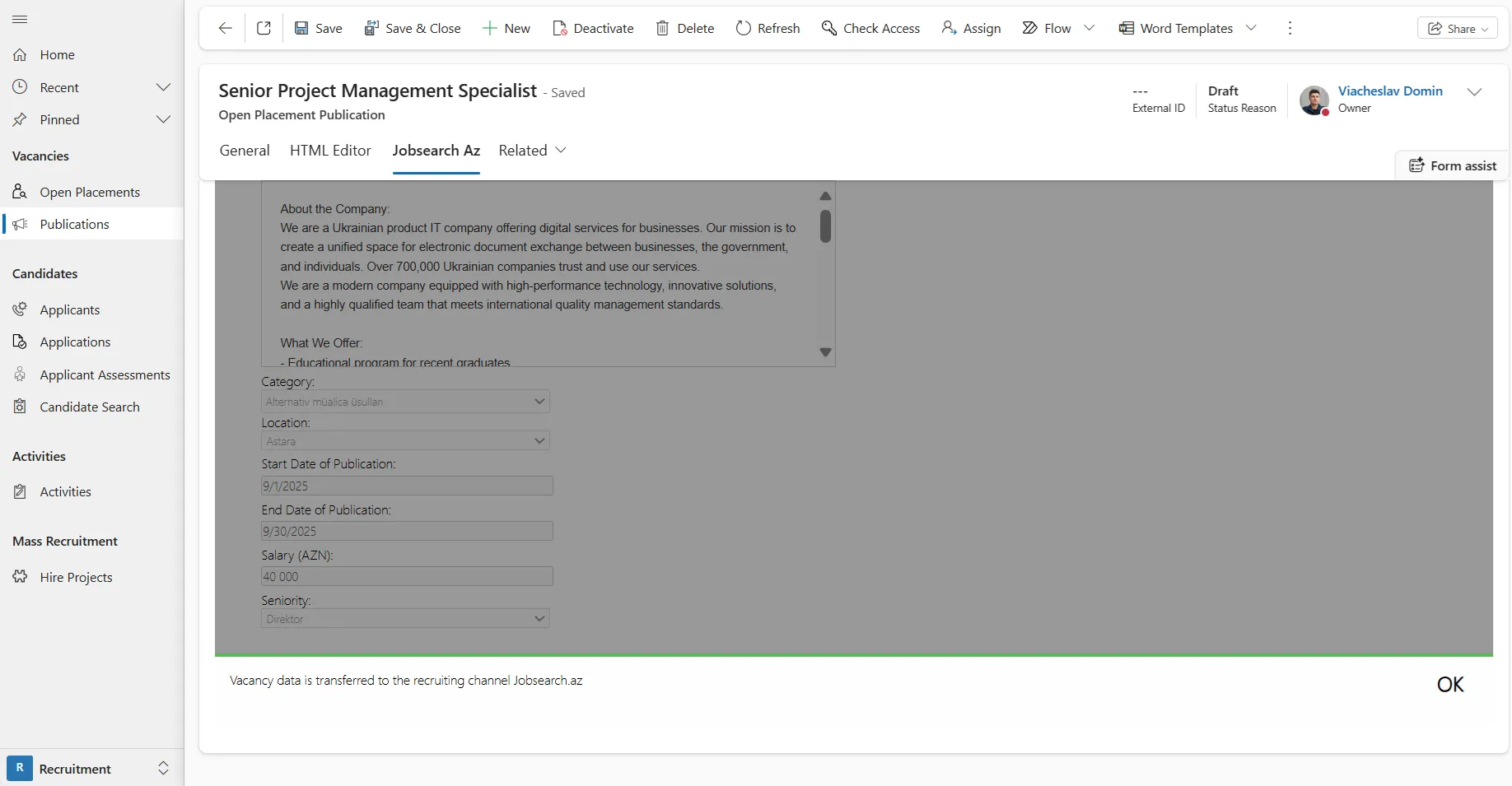
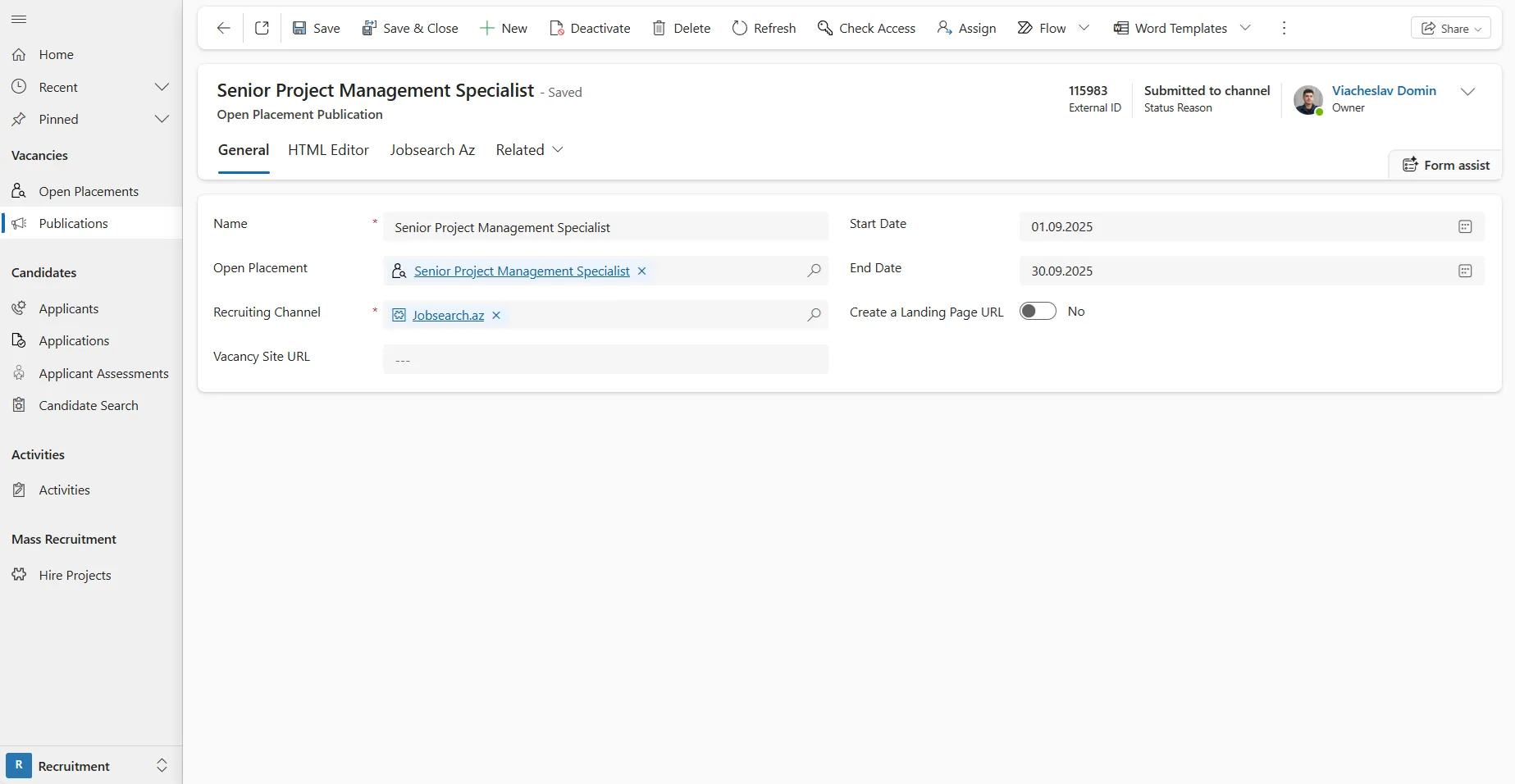
- After clicking Publish vacancy, the system sends the posting request to the site, and the status changes to Sent to channel.
- Verification and publishing.
- The vacancy is reviewed by Jobsearch.az moderators.
- If approved:
- The vacancy is automatically published on the site for one month.
- The status in SMART HCM & LMS changes to Published.
- The responsible recruiter receives a notification of approval.
- If rejected:
- The status in SMART HCM & LMS changes to Inactive.
- The responsible recruiter receives a notification of rejection.
- Candidate responses.
- When a candidate applies for a vacancy on Jobsearch.az, they are redirected to a Landing Page created in SMART HCM & LMS.
- Candidates fill out the application form and can attach a resume.
- After submission, the system automatically creates or updates the Candidate and Response records according to SMART HCM & LMS standard logic.
Who benefits:
- Azerbaijani companies looking to reach the country’s largest local job portal.
- International companies with offices in Azerbaijan that operate regionally and want to manage recruitment centrally.
- Recruiters who value speed, simplicity, and automation in the hiring process.
What makes it convenient?
- Centralized posting: Vacancies are published directly from SMART HCM & LMS — no need to re-enter data.
- Flexible editing before submission: Recruiters can edit job details right in the system using the built-in Jobsearch.az job builder.
- Recruiter notifications: Automatic alerts keep responsible recruiters informed about job posting approvals or rejections.
- Streamlined candidate responses: Candidates apply through a landing page integrated with the system, making it easy to track applications.
Additional feature options:
- Supports both individual job postings and mass hiring projects.
- Each job post on Jobsearch.az is published for one month.
- The responsible recruiter automatically receives status notifications on publication requests.
- Account administration is handled exclusively by Jobsearch.az representatives.
Why it matters:
Integration with Jobsearch.az:
- Enables instant access to candidate responses from Azerbaijan’s key job platform.
- Allows employers to reach a broader talent market without extra steps.
- Boosts recruitment efficiency across the local market.
Goal Setting Module. Automatic Goal Completion — a Simple Way to Close the Evaluation Process in One Click
Completing the Evaluation Procedure has just become even easier. With a single click, all Goal Lists and Assigned Goals move to their final status. Save time, reduce manual actions, and get reliable results instantly.
What’s new?
In SMART HCM & LMS, the functionality of the Change Stage button in the Evaluation Procedure has been enhanced with a new option — Completion.
Now, a module administrator can move all Goal Lists and Assigned Goals to the Completed status in one click. This allows quick closure of the evaluation process with full control over data accuracy and without unnecessary manual work.
How it works:
- After finishing the Finalization stage, the Change Stage button becomes available in the “Evaluation Procedure” record, showing a new option — Completion.
- Once the Completion option is selected, the system automatically checks whether all employees have entered their actual results.
- If results are available — those Goal Lists and Assigned Goals move to the Completed
- If results are missing — those Goal Lists and Assigned Goals remain active, and the module administrator can identify employees who still need to submit their results.
- If a Goal List has no Assigned Goals or is not linked to an employee — such Goal Lists are automatically marked as Completed.
- All changes are applied in bulk and recorded in the system history, and the entire Evaluation Procedure moves to its final stage — Completion.
Who benefits:
- Module administrators — to complete the entire evaluation process in one click, avoiding manual work.
- Process owners — to ensure transparency, control, and accuracy of data that form the basis for analytics and reporting.
What makes it convenient?
- Time optimization: Complete evaluations without opening each Goal List manually.
- Process control: The system automatically indicates which employees haven’t yet entered actual data.
- Transparency: All actions are logged, showing which user initiated the process.
- Logical stage sequence: Execution → Finalization → Completion.
Additional feature options:
- Handles large data volumes thanks to optimized functionality.
- Localized modal windows with intuitive messages for users.
- Automatic notifications when the status change process begins.
Why it matters:
- Automates the completion and result recording process, reducing human error.
- Makes the procedure transparent and easy to follow for all participants.
- Enables a faster transition to subsequent business processes after evaluation.
HR Management Module. Make Managerial Decisions Based on Up-to-Date Salary Data in the Manager’s Dashboard
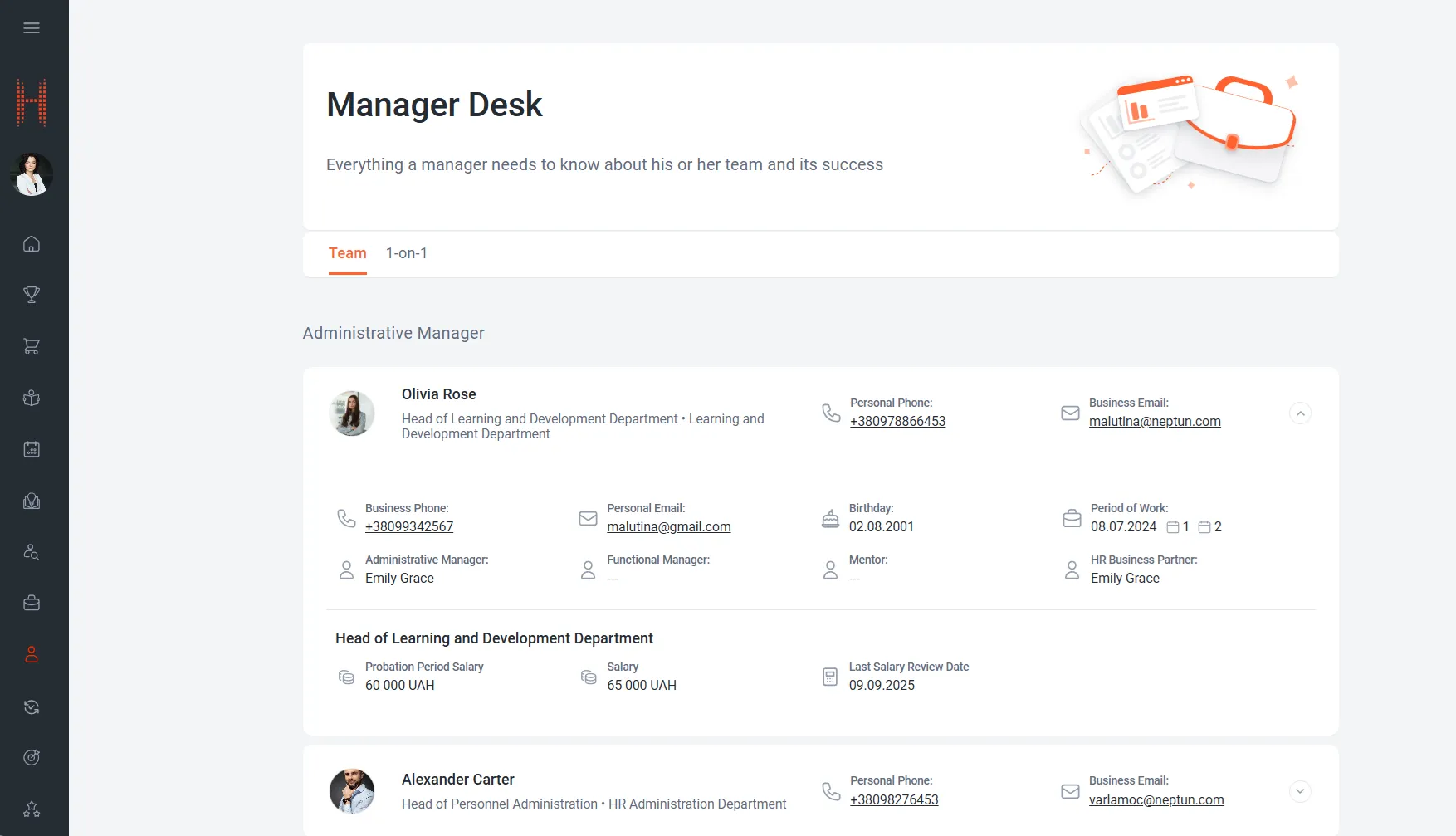
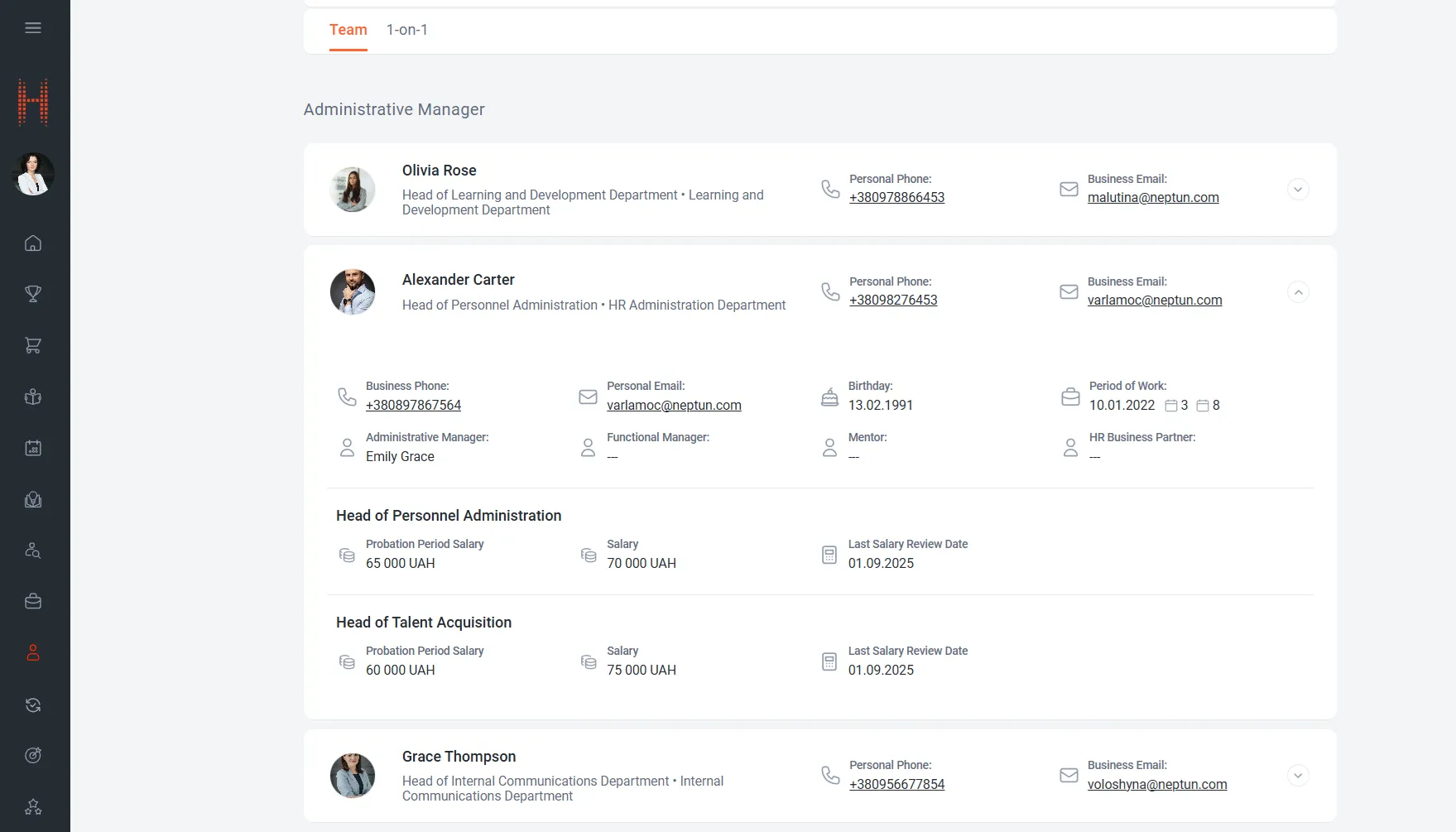
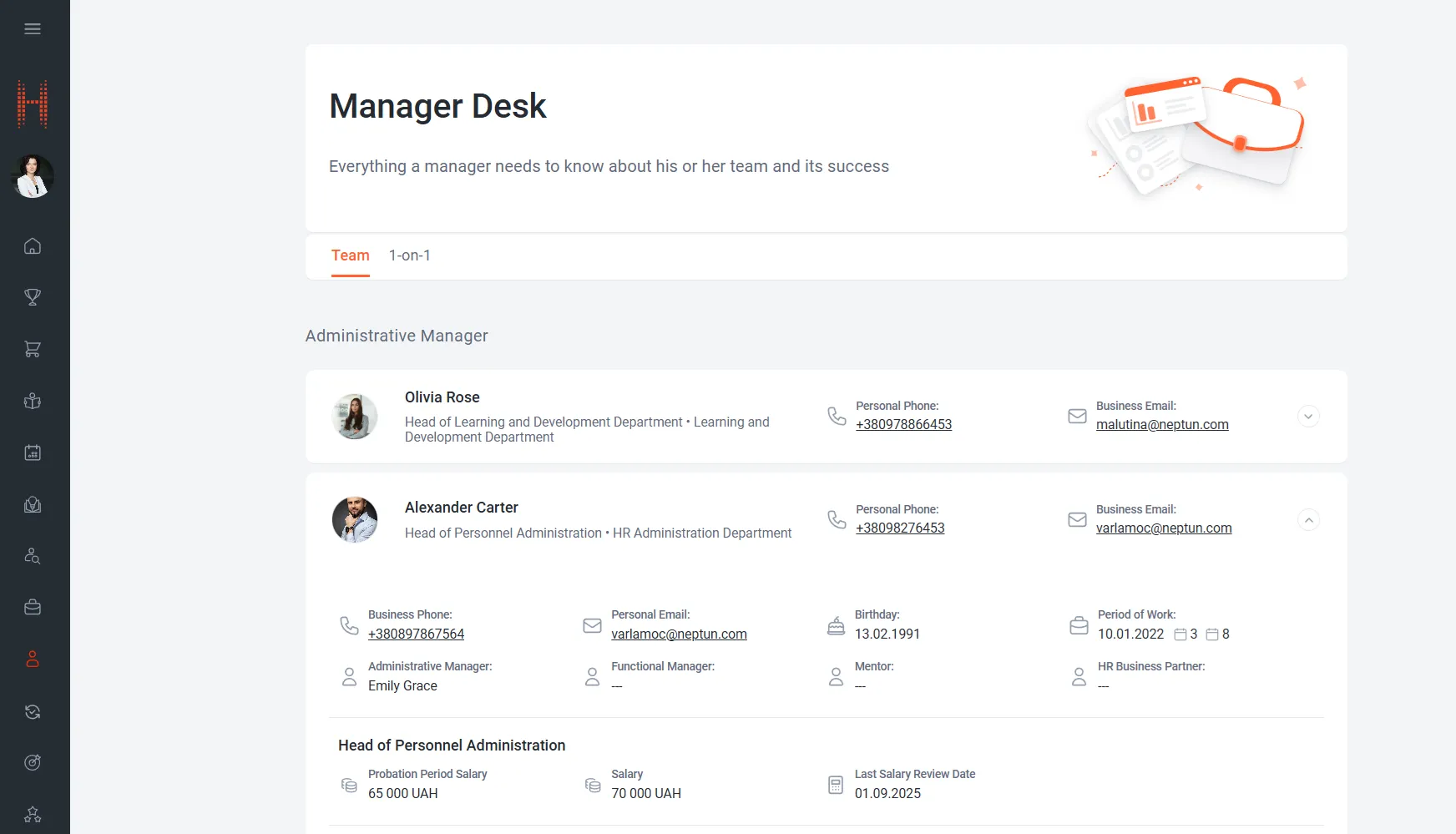
Administrative managers have gained another convenient tool for managing their team s/Making management decisions is now even easier. We’ve expanded the functionality of the Self-Service Portal: in the Manager’s Dashboard, under the Team tab, salary information for administrative subordinates is now available.
Managers can now view at any time:
- salary during the probation period,
- current salary,
- date of the last salary review.
This allows managers to make informed decisions faster, plan team development, and reduce the number of requests to HR departments while ensuring transparency in HR processes./This makes it possible to make management decisions faster, plan the team’s development and minimize the requests to the HR service.
What’s new?
- The Team tab in the Self-Service Portal has been enhanced with extended employee card functionality.
- For each subordinate position where the current user is listed as an administrative manager, key salary parameters are displayed:
- Position title
- Salary during the probation period (with currency)
- Current salary (with currency)
- Date of the last salary review
- Data is retrieved directly from the external ERP system and updated automatically.
- If information is unavailable, the system clearly notifies the user within the interface.
How it works:
- Automatic data retrieval: Current salary information is automatically obtained from the external ERP system via a built-in API.
- Data display in the administrative interface: In the Position record, a module administrator (with proper access rights) can review the salary data retrieved for an employee.
- Data display on the Self-Service Portal:
- Data is always displayed in its most recent version — no additional HR requests needed.
- Salary information is shown as a convenient table directly in the subordinate’s card, under the Team tab in the Manager’s Dashboard section.
- If a subordinate holds multiple positions, where the current user is their administrative manager, each position and salary entry is displayed as a separate row.
Who benefits:
- Administrative managers — for transparent management of subordinates’ salaries and informed decision-making.
- HR departments and personnel administrators — to reduce the number of salary-related requests from managers and automate access to employee data.
What makes it convenient?
- Up-to-date information: Data is synchronized with the external ERP system.
- Simple, accessible interface: Managers can access all salary data directly from the Self-Service Portal.
- Process transparency: Access is limited to administrative managers only; data can be viewed but not edited or exported.
Additional feature options:
- Access control: Managers can view data only for their administrative subordinates.
- Security: Data is read-only — with no editing or export options. In the administrative interface, salary data access is regulated by security roles.
Why it matters:
- Managers get real-time salary data directly in the Self-Service Portal, minimizing the need for HR inquiries.
- The feature supports faster, more data-driven managerial decisions.
- It ensures transparency and control over compensation within the team.
Event Management Module. Flexible Control of Session Visibility in the Self-Service Portal
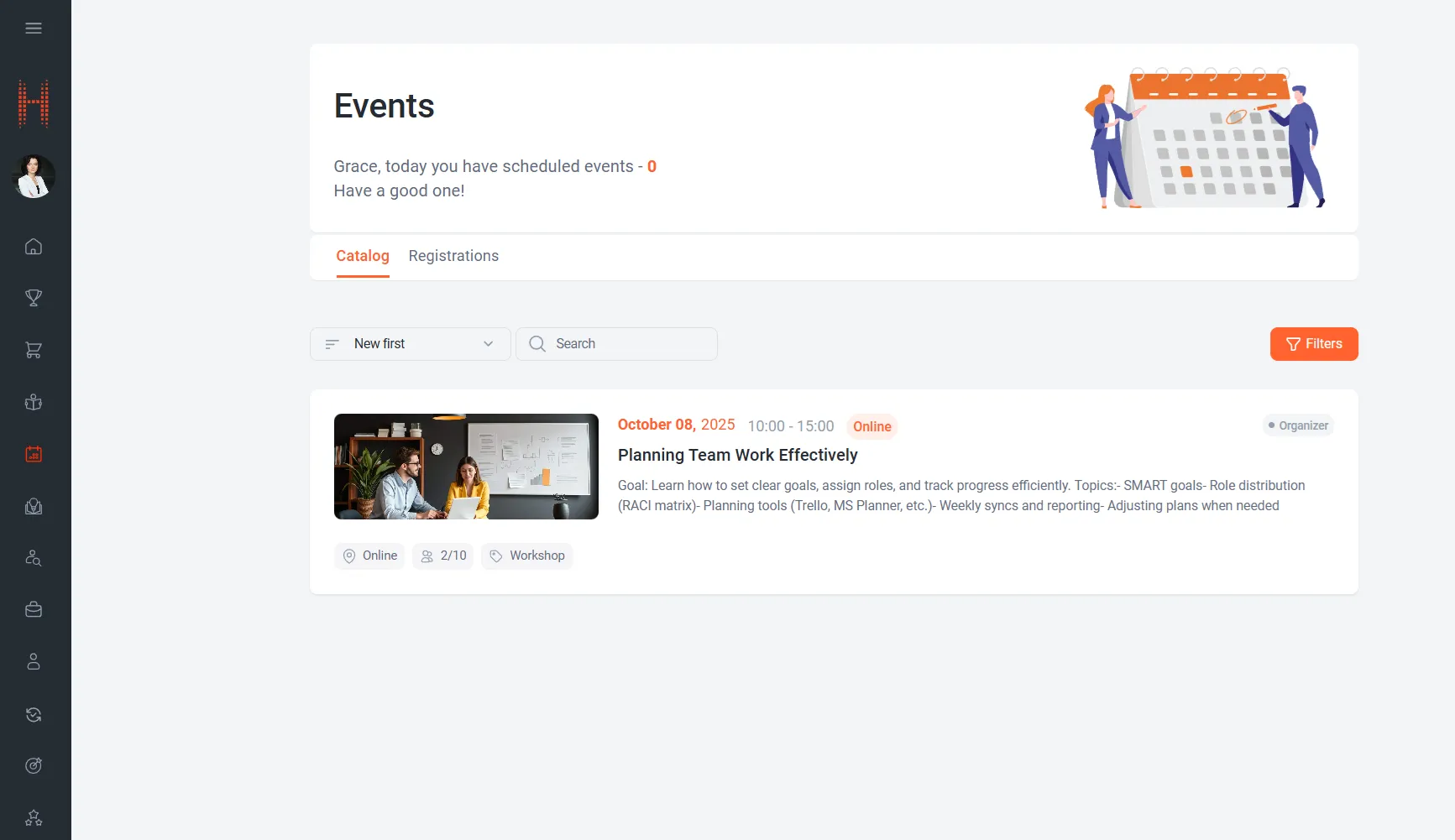
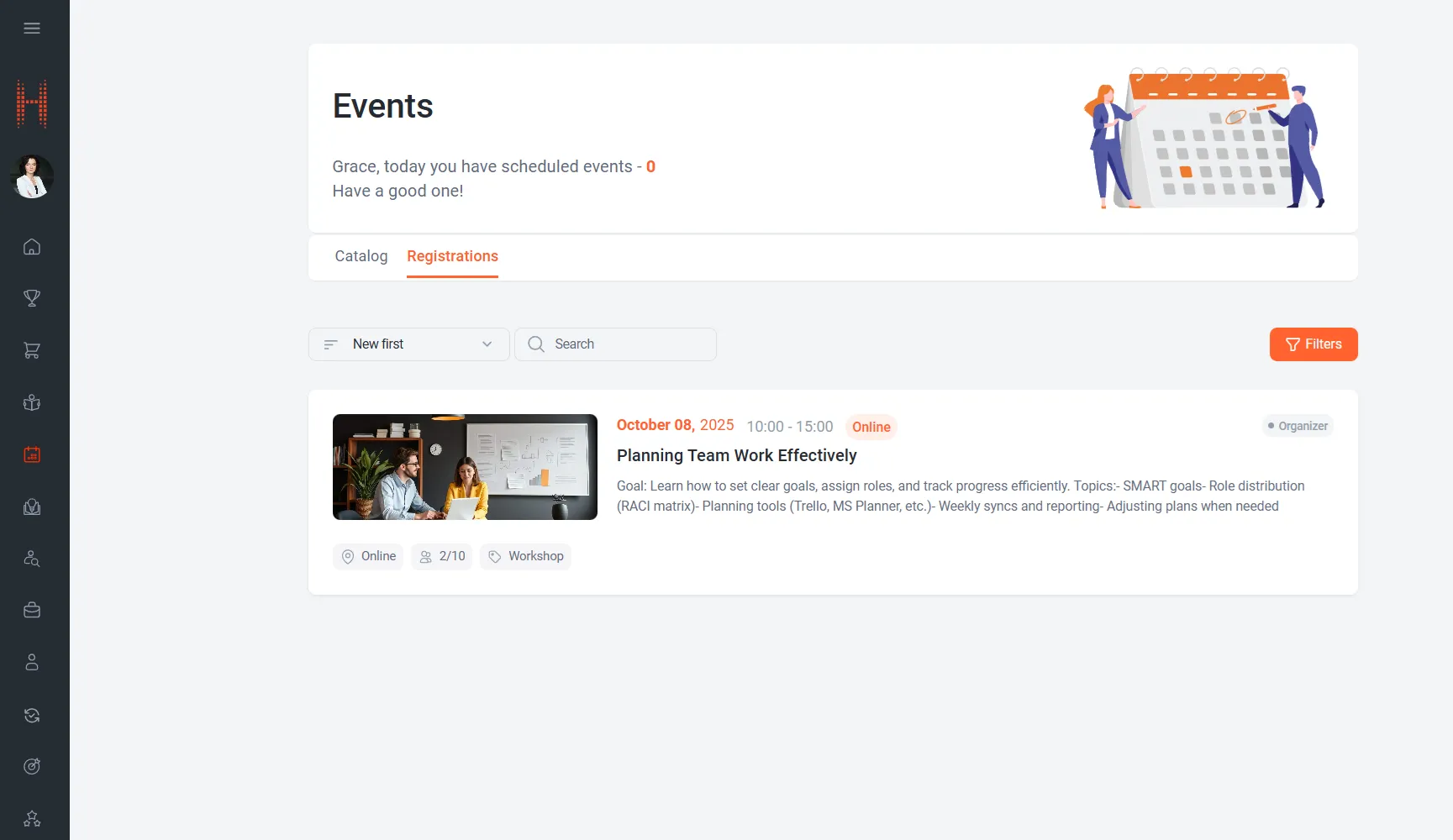
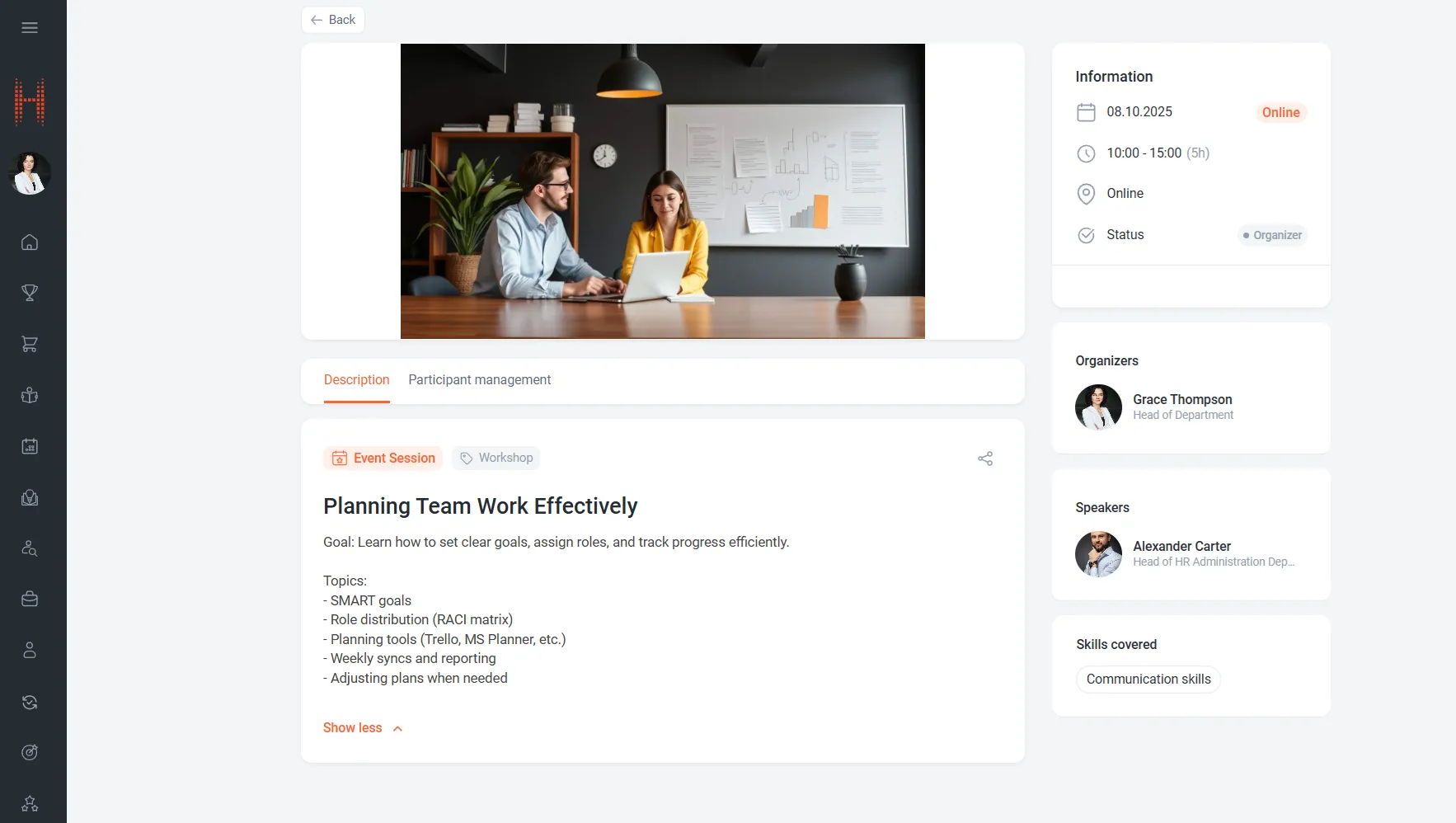
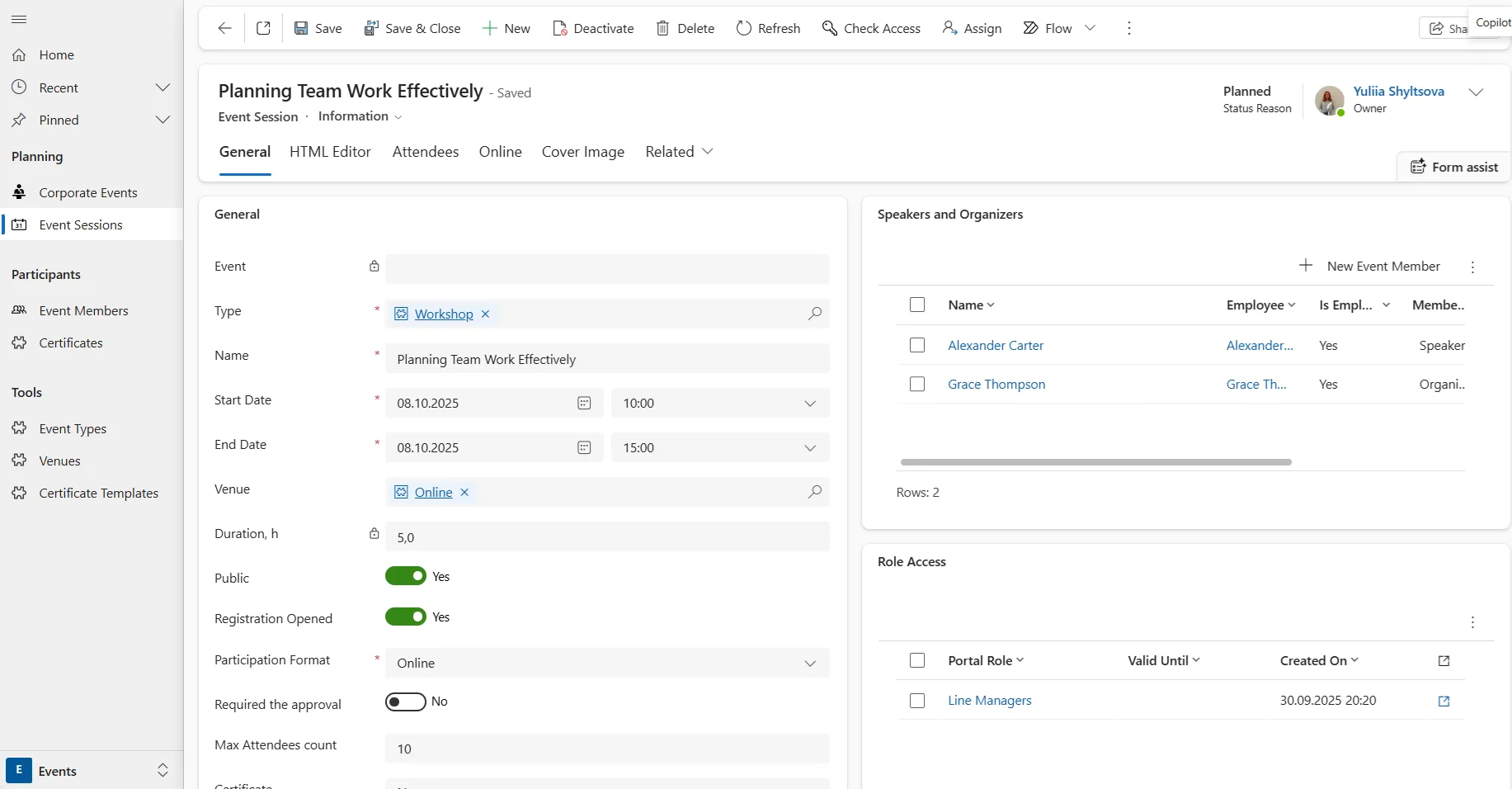
More personalization for employees. We’ve enhanced the Event Management module by adding the ability to control the visibility of Sessions in the Self-Service Portal according to user access roles when they are not linked to an Event.
What’s new?
A table of access roles has been added to manage the visibility of Sessions in the Self-Service Portal that are not associated with an Event.
How it works:
- Setup in the administrative interface:
- Module administrators can assign access roles for individual Sessions or for an entire Event.
- If a Session is linked to an Event, access is managed at the Event level according to standard SMART HCM & LMS logic.
- For a standalone Session, access is configured at the Session level by adding a defined list of portal roles that should see the Session in the Self-Service Portal.
- Display in the Self-Service Portal:
- In the Catalog tab of the Events section, employees see only the Sessions that match their portal role.
- This reduces information overload and makes working with Sessions more intuitive.
- In the Registrations tab of the Events section, access roles do not affect the display of Sessions for which the employee is already registered.
Who benefits:
- Employees — to see only relevant Sessions that support skill and competency development.
- Module administrators — for flexible access configuration and personalization of the participant experience.
- Companies — to enhance security and improve efficiency in managing corporate events.
What makes it convenient?
- Personalization: Each employee sees only what corresponds to their functional role.
- Control and security: Module administrators manage access at both Event and individual Session levels.
Why it matters:
- Employees see only relevant Sessions, increasing the convenience of using the Self-Service Portal.
- Module administrators gain more options for personalization and control over Session visibility.
1-on-1 in SMART HCM & LMS: Transparent Communication and Team Development
What’s new?
The 1-on-1 meeting functionality has been integrated into SMART HCM & LMS.
Managers and HR Business Partners can now organize, document, and review the outcomes of regular meetings with employees in a single system — no additional tools required.
This means:
- Integration with other HR processes: goal setting and individual development plan creation.
- Convenience for managers and HRBPs thanks to a unified workspace.
How it works:
- In the Manager’s Dashboard of the Self-Service Portal, a dedicated 1-on-1 page has been added.
- Creating meeting templates: Administrators and HR specialists can create and edit templates with key topics and questions.
- Different types of discussion items are supported:
- Mandatory (*)
- Private (not visible to the employee)
- With the ability to immediately create IDP items or Assigned Goals.
- Templates ensure structure and consistency across all company meetings.
- Different types of discussion items are supported:
- Conducting and saving 1-on-1 meetings.
- Managers and HRBPs can:
- Create meeting records using ready-made templates
- Record discussed points and comments
- Thanks to integration with functional modules, from the 1-on-1 page you can:
- Create a new Assigned Goal in an existing Goals List
- Add items to the Individual Development Plan
- Reviewing history and results.
- Managers and HRBPs can view the full history of meetings with each employee.
- Access to review respondent answers.
- Quickly track progress, changes in responses, and employee development.
- Managers and HRBPs can:
Who benefits:
- Managers — for effective organization of regular meetings and centralized storage of meeting history.
- HR Business Partners — for process control, feedback analysis, and supporting managers in employee development.
- Companies — to ensure transparent communication, retain interaction history, and strengthen corporate culture.
What makes it convenient?
- Unified meeting history: all 1-on-1 results are stored centrally.
- Flexibility and intuitive interface: create your own templates for different meeting formats; intuitive interface with filters, search, and quick access to history.
- Automation of next steps: ability to create Assigned Goals and IDP items directly from the 1-on-1 page.
Additional feature options:
- Analytics: view responses dynamically to track development.
- Flexible administration: create, copy, activate/deactivate templates in a single interface.
Why it matters:
- Creates a unified space for managers and HR to conduct effective meetings.
- Helps systematically track meeting history and employee progress.
- Strengthens a culture of open feedback and employee development.
OKR in SMART HCM & LMS: from Goal Setting to Measurable Results
What’s new?
We’ve implemented the first version of the OKR (Objectives and Key Results) tool on the Self-Service Portal.
Now companies can manage OKRs in a single environment: set objectives, add key results and initiatives, monitor progress, statuses, and check-ins — all directly on the Self-Service Portal.
How it works:
Section structure.
- A new page “All OKRs” has been added under the Goals section on the Self-Service Portal.
Filters and navigation.
- Filters include: Period Dates (All, Current Year/Quarter, Next Quarter, Custom Range), Owner (Assigned to me, select one or more), Status (On Track, At Risk, Behind, Not Started, Deferred; and Completed).
- Selected periods automatically populate start/end dates, but the range can be manually adjusted.
- Each filter displays a counter of matching items on the screen; the Reset Filters button restores default values.
“All OKRs” view visualization.
- Displayed as a table with a hierarchy of up to 4 levels.
- Columns for quick overview: Name, Owner, Team, Status & Progress, Last Update, Last Check-in Note, Period, Start Date, End Date.
- Icons differ for objectives, key results, and initiatives; long names are truncated with a tooltip for clarity.
Creating OKRs
- The + Create Goal button opens the Goal form, where users fill in required and recommended fields, assign phased target metrics, and configure progress and status definitions. Users can also add multiple Owners and define the team supporting the goal.
- Users can then create related elements: Key Result, Initiative, and Child Goal.
Actions with elements.
- Edit (for active elements)
- Comment
- Add child elements (for goals: Key Result, Initiative, or Child Goal)
- Set weight of influence (defines how the contribution of child elements affects progress). This option is available for goals with automatic progress calculation and two or more associated child elements.
- Complete (final registration of actual results)
- Copy (create a new element based on the current one)
- Cancel (set to inactive)
Progress and status.
- Progress:
- Update from child elements (taking into account the weight of each child element, sum = 100%), or
- Update manually (via check-ins)
- Status:
- Update based on progress (automatically compares actual vs. expected values for the current date, following rules for On Track / At Risk / Behind), or
- Update manually (via check-ins)
Who benefits:
- Managers — for transparent goal setting, progress control, and real-time decision-making.
- HR specialists — to align team and individual goals with company strategy.
- Companies — to increase efficiency and employee engagement.
- Employees — for better understanding of their contribution and clear expectations.
What makes it convenient?
- Single environment — create and monitor OKRs directly on the Self-Service Portal.
- Transparency — everyone sees all goals, progress, and team responsibilities.
- Flexible filters and hierarchy — easily find OKRs and view details.
- Automation — statuses and progress can update automatically.
- Collaboration — assign multiple owners and teams, leave comments, and track updates.
Additional feature options:
- Assignment of phased target metrics (e.g., quarterly results).
- Last updates and check-in notes without opening the element card.
- Ability to copy OKR elements for fast creation of new ones.
- Visual status indicators (colors) and progress bar with expected vs. actual values.
- Smart hierarchy handling — one OKR element can be linked to multiple parent OKRs and displayed separately under each.
Learn more
OKR (Objectives and Key Results) is a modern goal management methodology that helps companies:
- align individual and team objectives with the overall strategy,
- track results transparently, and
- respond quickly to change.
With the new tool in SMART HCM & LMS, you gain a unified space for setting, monitoring, and analyzing OKRs — boosting both employee productivity and motivation.
Why it matters:
- Enables you to manage objectives and key results directly in the Self-Service Portal.
- Ensures transparency of strategic plans and real-time progress tracking.
- Aligns individual employee goals with the company’s overall objectives.
Recruiting Module. Keyword-Based Candidate Search
What’s new?
We’ve enhanced the Recruiting module with a new feature — Candidate Search.
Recruiters can now find the right specialists by searching for keywords across all candidate data — from parsed resume results to responses and candidate evaluations.
Search results are displayed in a convenient table, enabling instant interaction — from adding candidates to the Talent Pool to creating Responses for open vacancies or hiring projects.
How it works:
- The module administrator opens the Candidate Search section within the Recruiting workspace.
- Keywords and operators (AND, OR, NOT, exact phrase, etc.) are entered into the search field.
- The system retrieves all relevant records, including parsed resume data, responses, and candidate evaluations.
- Results are displayed in an interactive table where users can:
- filter and sort data,
- customize columns,
- quickly open the candidate profile.
- If more than 500 results are found, additional data can be loaded using the Load more
- Selected candidates can be immediately:
- added to the Talent Pool, or
- used to create Vacancy response or hiring projects.
Additional feature options:
- Bulk actions: manage multiple candidates at once to save time.
- Up-to-date data: the search covers both automatically parsed resume details and manually updated fields.
- Result prioritization: the most relevant candidates appear at the top of the list.
- Transparency: each result shows when the data was last indexed.
Who benefits:
- Recruiters — quickly search candidates even in large databases.
- HR Directors — efficiently manage the Talent Pool and plan strategically.
- Companies — reduce time-to-hire and improve recruitment efficiency.
Why it matters:
- Time-saving: searches take just seconds.
- Accuracy: keywords and filters deliver only relevant results.
- Convenience: all candidate data is available in one window.
- Efficiency: less manual work — more time for meaningful candidate communication.