What has been delivered?
A new Job Requirements Configurator has been introduced to provide a centralized workspace for managing competency frameworks, skills, qualifications, assessment structures, and evaluation rules for Jobs, Job Profiles, and Requirement Models.
The solution enables organizations to build and maintain complex requirement hierarchies using an intuitive self-service interface while keeping administrative settings centrally managed within SMART HCM & LMS.
The portal supports the complete lifecycle of requirement management, including:
- creation and maintenance of requirement sets;
- management of competencies, skills, and qualifications;
- behavioral indicator configuration;
- assessment role configuration;
- weight distribution management;
- entry and regular requirement structures;
- requirement model creation and reuse;
- synchronization of requirements from Jobs to Job Profiles.
The enhancement introduces a structured three-level hierarchy:
Requirement Set -> Requirement -> Behavioral Indicator
This approach allows organizations to standardize job requirements while maintaining flexibility for different business units, jobs, job profiles, and assessment scenarios.
How does it work?
• Unified configuration experience
The following entity forms are available on the self-service portal.
- Jobs
- Job Profiles
- Requirement Models
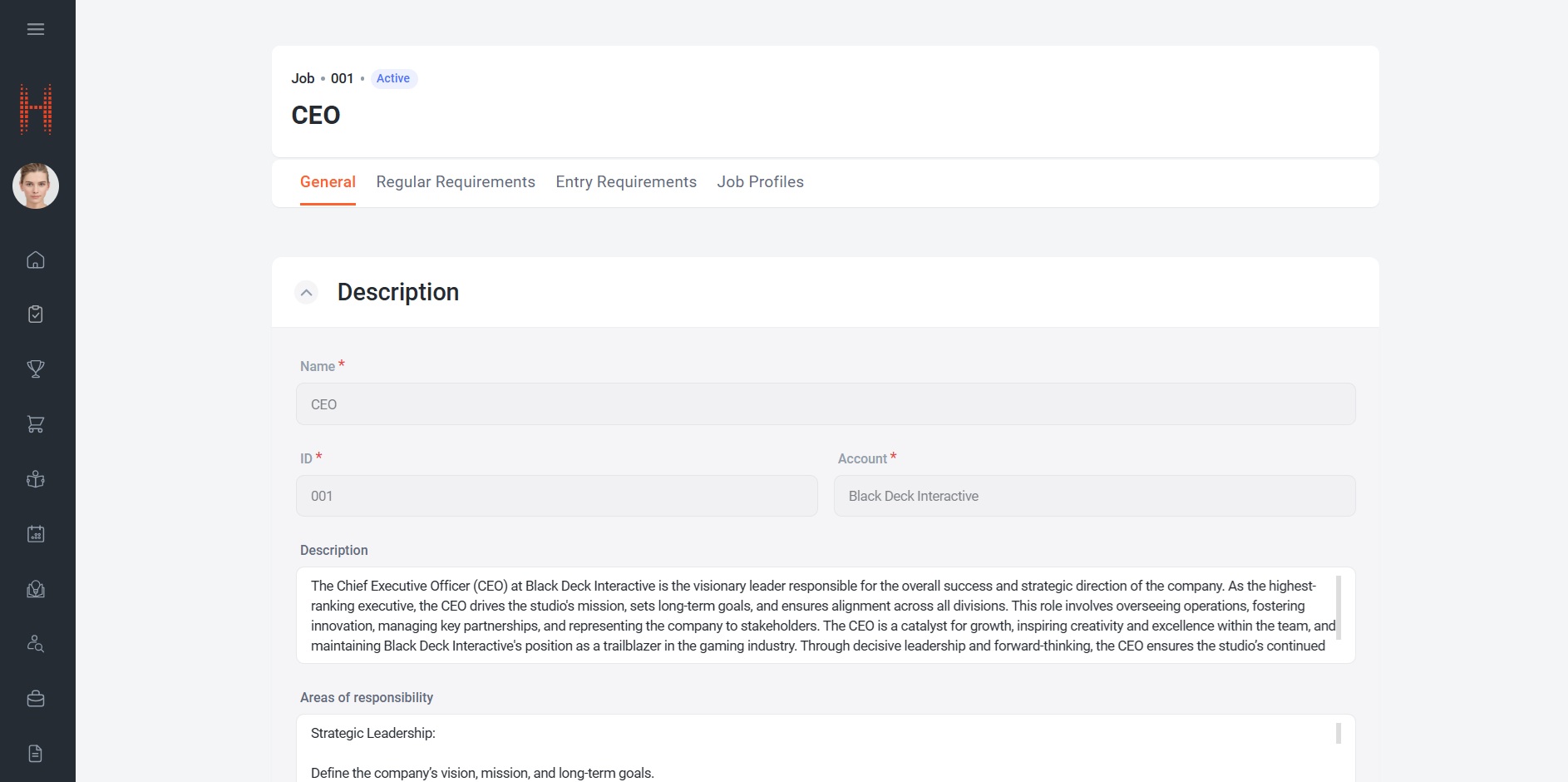
Depending on the selected object, the portal displays dedicated configuration pages allowing users to manage general information, requirements, assessment settings, and linked profiles.
• Structured requirement hierarchy
Requirements are organized using a multi-level framework that allows users to define exactly what is expected from employees occupying a specific position.
The hierarchy consists of:
Requirement Sets
Requirement Sets group related requirements together.
Each Requirement Set can have:
- its own calculation method;
- its own assessment weights;
- role-specific assessment configuration.
Requirements
Within each Requirement Set, users can add individual requirements.
Depending on the Requirement Set type, requirements may represent:
- competencies;
- skills;
- qualifications.
Each requirement can include:
- required proficiency levels;
- assessment status;
- weighting configuration;
- role-specific assessment settings.
Requirements support drag-and-drop ordering, allowing organizations to prioritize the most important capabilities.
Behavioral Indicators
For competency-based requirements, behavioral indicators can be added to provide more detailed evaluation criteria.
Behavioral indicators help define observable behaviors that demonstrate competency mastery and can be individually weighted and assessed.
• Flexible weighting framework
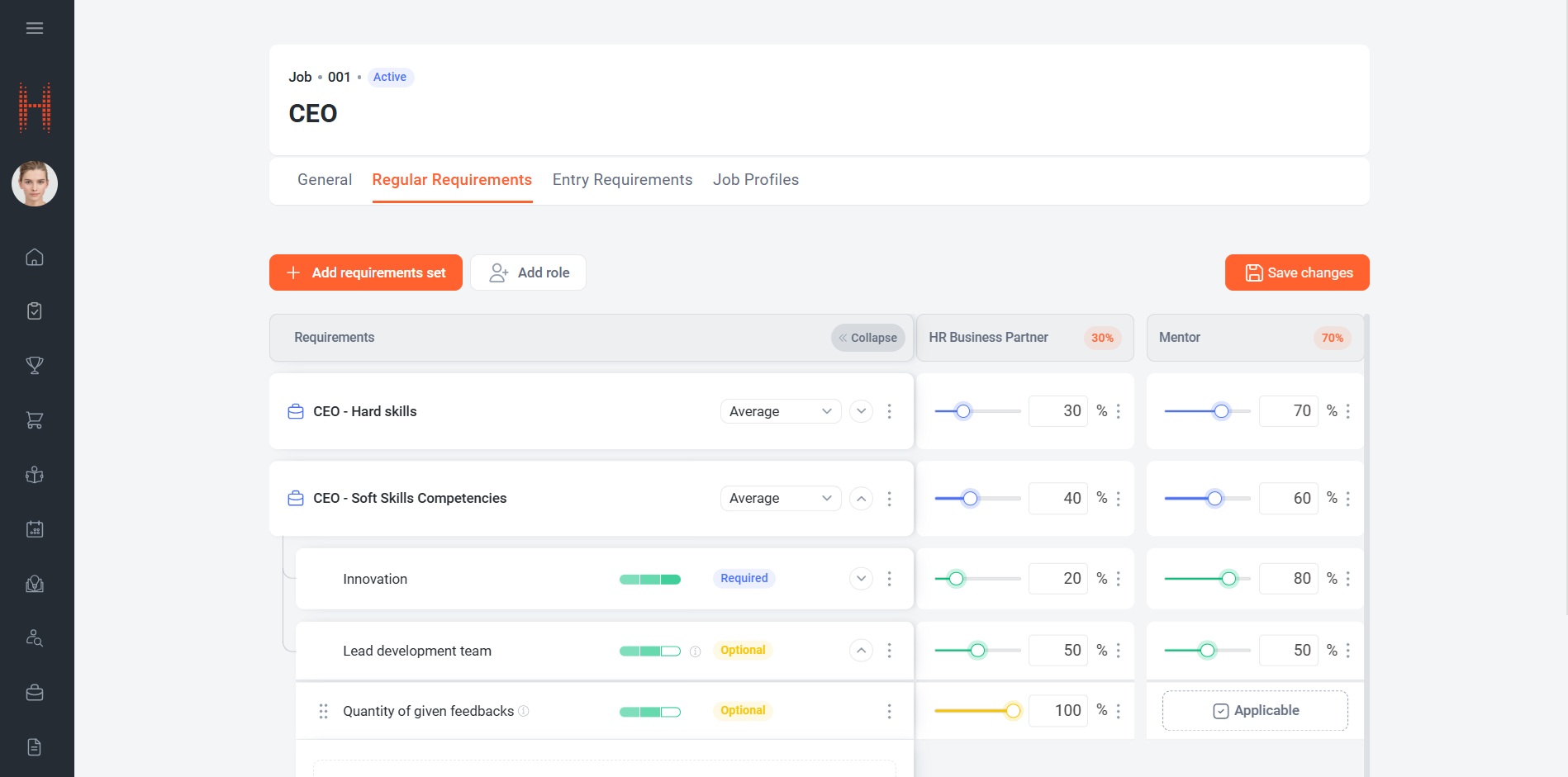
The solution introduces a highly configurable weighting engine.
Organizations can determine how assessment weights should be distributed through administrative settings.
Weight validation can be performed:
- across Requirement Sets;
- across Requirements;
- across Behavioral Indicators;
- across Assessment Roles.
Portal automatically validates weight distribution according to organization assessment rules.
This allows organizations to support different assessment methodologies without changing the requirement structure itself.
• Assessment role management
Organizations can define who participates in employee evaluations.
Examples include:
- Manager;
- HR;
- Peers;
- Functional Experts.
Multiple assessment roles can be configured for the same Job or Job Profile.
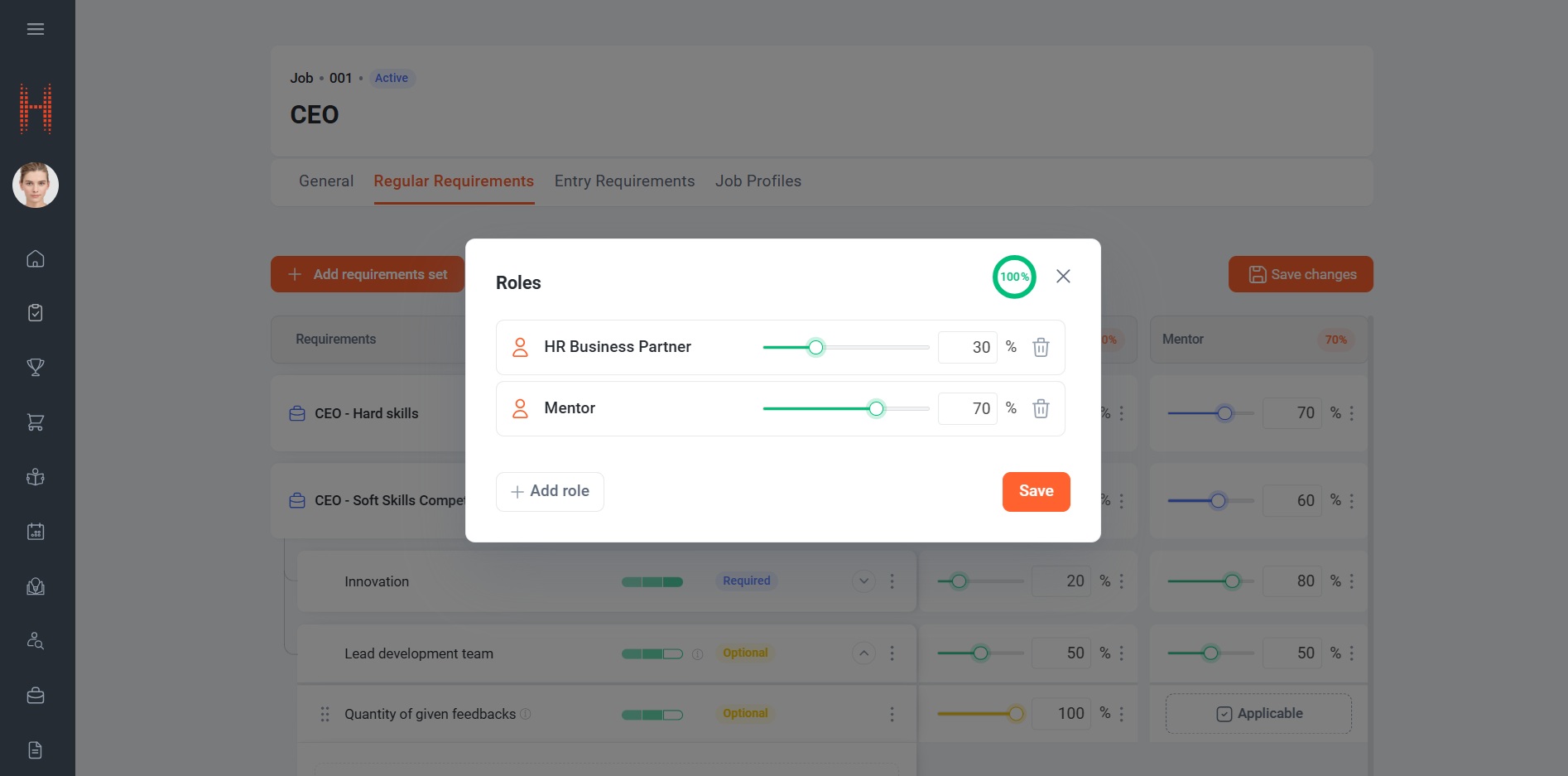
Users can:
- add assessment roles;
- define role weights;
- update role participation;
- control how each role contributes to the final assessment result.
The portal continuously validates total role contribution to ensure a complete 100% assessment model.
• Requirement status management
Each requirement can be assigned one of three statuses:
Required – The requirement participates in assessment and is mandatory.
Optional – The requirement participates in assessment but is not mandatory.
Not Assessed – The requirement is excluded from assessment calculations.
This enables organizations to maintain complete competency libraries while selectively applying certain requirements for assessment purposes.
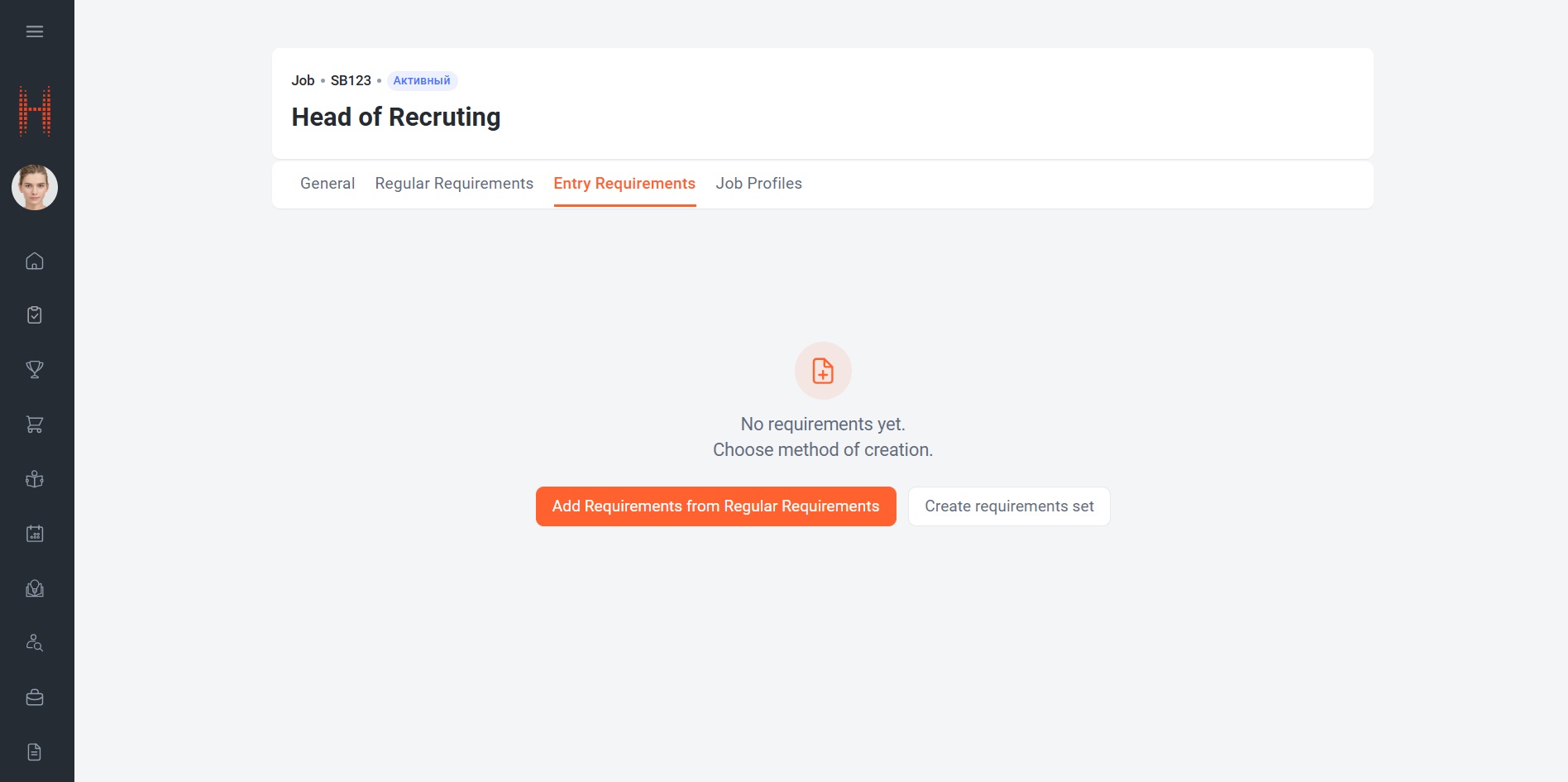
• Entry Requirements and Regular Requirements
The portal supports two independent requirement structures:
Regular Requirements – used to define the ongoing requirements needed to perform a role successfully.
Entry Requirements – used to define requirements that must be met before an employee can occupy a position.
Organizations can:
- create Entry Requirements from scratch;
- copy them from Regular Requirements and after that update them independently.
This provides flexibility when hiring criteria differ from ongoing performance requirements.
• Requirement Model reuse
To reduce configuration effort, organizations can create reusable Requirement Models.
A Requirement Model can contain:
- Requirement Sets;
- Requirements;
- Behavioral Indicators;
- Assessment Parameters;
- Weighting configuration;
- Assessment Role assignments.
When creating a new Job or Job Profile, users can import an existing Requirement Model and instantly receive a preconfigured requirement structure.
This significantly accelerates implementation and ensures consistency across positions.
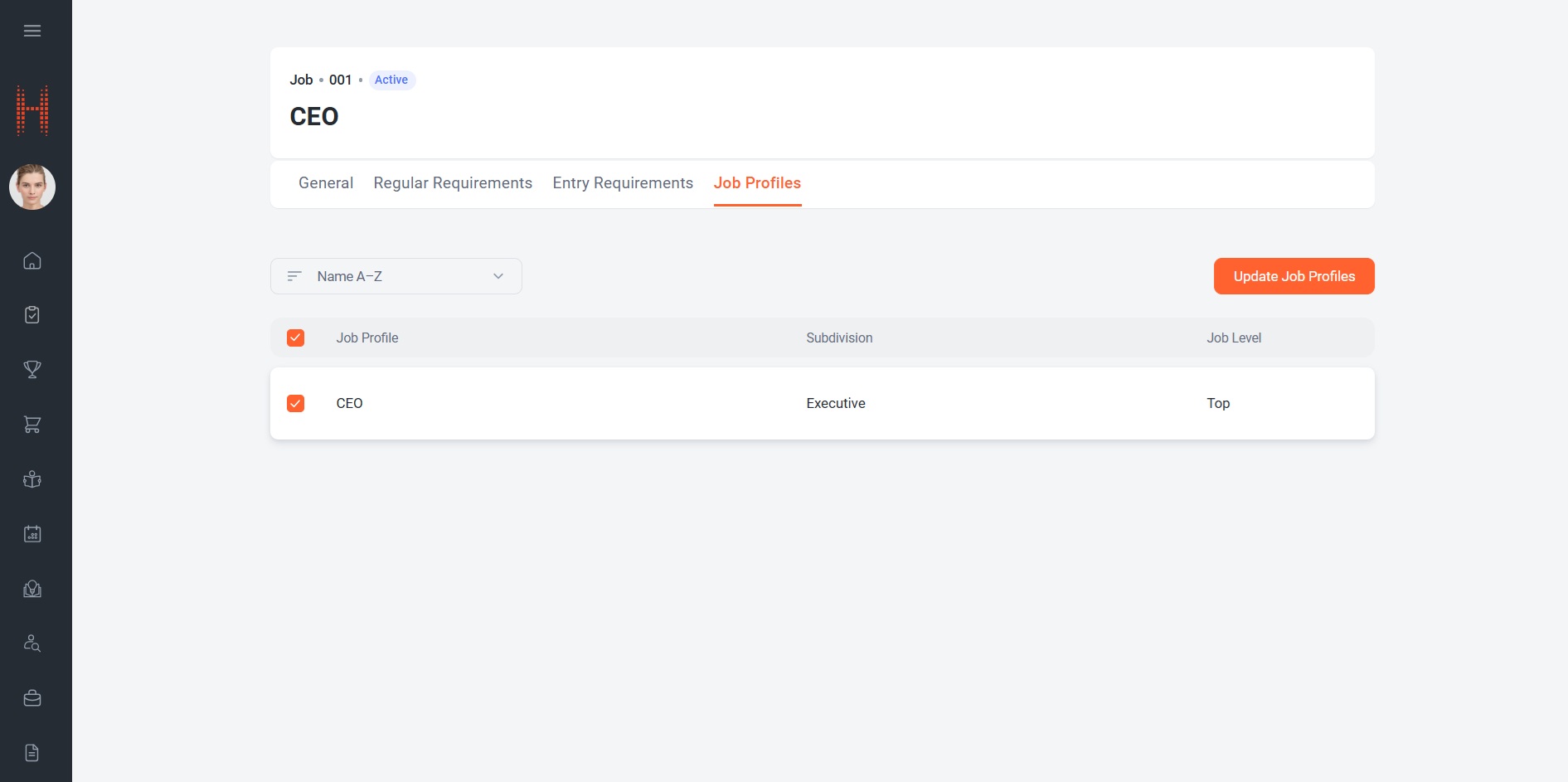
• Job Profile synchronization
A new synchronization mechanism allows organizations to propagate Job requirement changes into related Job Profiles.
Users can select one or multiple Job Profiles related to the Job and update the requirements.
The system automatically transfers:
- Requirement Sets;
- Requirements;
- Behavioral Indicators;
- Assessment Parameters.
This ensures consistency between corporate job standards and individual Job Profiles.
Who will benefit?
• HR Administrators
For centralized management of competencies, skills, qualifications, assessment structures, and organizational job frameworks.
• Talent Management Teams
For maintaining consistent competency models and assessment standards across the organization.
• Line Managers
For participating in the definition and maintenance of requirements for positions within their areas of responsibility.
Why is it convenient?
✓ Single place to maintain all job requirements
Manage Jobs, Job Profiles, and Requirement Models from one unified portal.
✓ Flexible assessment configuration
Support multiple weighting strategies and assessment approaches without custom development.
✓ Reusable requirement models
Standardize role requirements and dramatically reduce setup effort.
✓ Detailed competency framework
Create structured hierarchies of competencies, skills, qualifications, and behavioral indicators.
✓ Role-based evaluation support
Define exactly who participates in assessments and how much influence each responder has.
✓ Independent Entry and Regular Requirements
Separate hiring requirements from ongoing performance requirements.
✓ Mass Job Profile updates
Propagate requirement changes from Jobs to multiple Job Profiles with a single action.
Additional feature capabilities
- Requirement Set management
- Competency, Skill, and Qualification configuration
- Behavioral Indicator management
- Drag-and-drop prioritization of requirements
- Role-based assessment configuration
- Weight distribution validation
- Configurable assessment calculation methods
- Entry Requirement management
- Requirement Model templates
- Bulk synchronization of Job Profiles
- Portal-based self-service configuration
- Administrative control of weighting strategies
- Support for reusable competency architectures
Why is this important?
Many organizations struggle with maintaining consistent job requirements across positions and subdivisions.
Without centralized governance, competency frameworks often become fragmented, duplicate effort increases, and assessment processes lose consistency.
The new Job Requirements Configurator creates a structured foundation for defining, managing, and reusing organizational requirements. By combining reusable requirement models, flexible weighting mechanisms, role-based assessments, and synchronized Job Profile updates, the solution helps organizations establish a scalable and standardized approach to talent management.
In short: it transforms job requirement management from a collection of disconnected records into a centralized, governed, and reusable competency architecture that supports hiring, assessment, development, and succession processes across the entire organization.
One-Time Password via Phone Number Authentication
What has been delivered?
A new One-time password via Phone Number Authentication method has been introduced to provide a fast, secure, and user-friendly way to access the self-service portal without using a permanent password.
Instead of memorizing credentials, users can authenticate using a one-time verification code sent directly to the mobile phone number associated with their account.
The solution combines strong identity verification with a simplified login experience, making Portal access more convenient while maintaining security controls such as code expiration, retry limits, and SMS delivery validation.
The new authentication method includes:
- mobile number verification;
- one-time password delivery via SMS;
- secure identity confirmation;
- automatic code validation;
- protection against brute-force attempts;
- controlled code resending;
- support for returning to alternative authentication methods.
How does it work?
• Login using a phone number
Users can access the self-service portal by selecting the new Login with Phone Number option on the authentication page.
To authenticate:
- Open the self-service portal.
- Select Login with Phone Number.
- Choose the country code.
- Enter the mobile phone number associated with the account.
- Click Send Code.
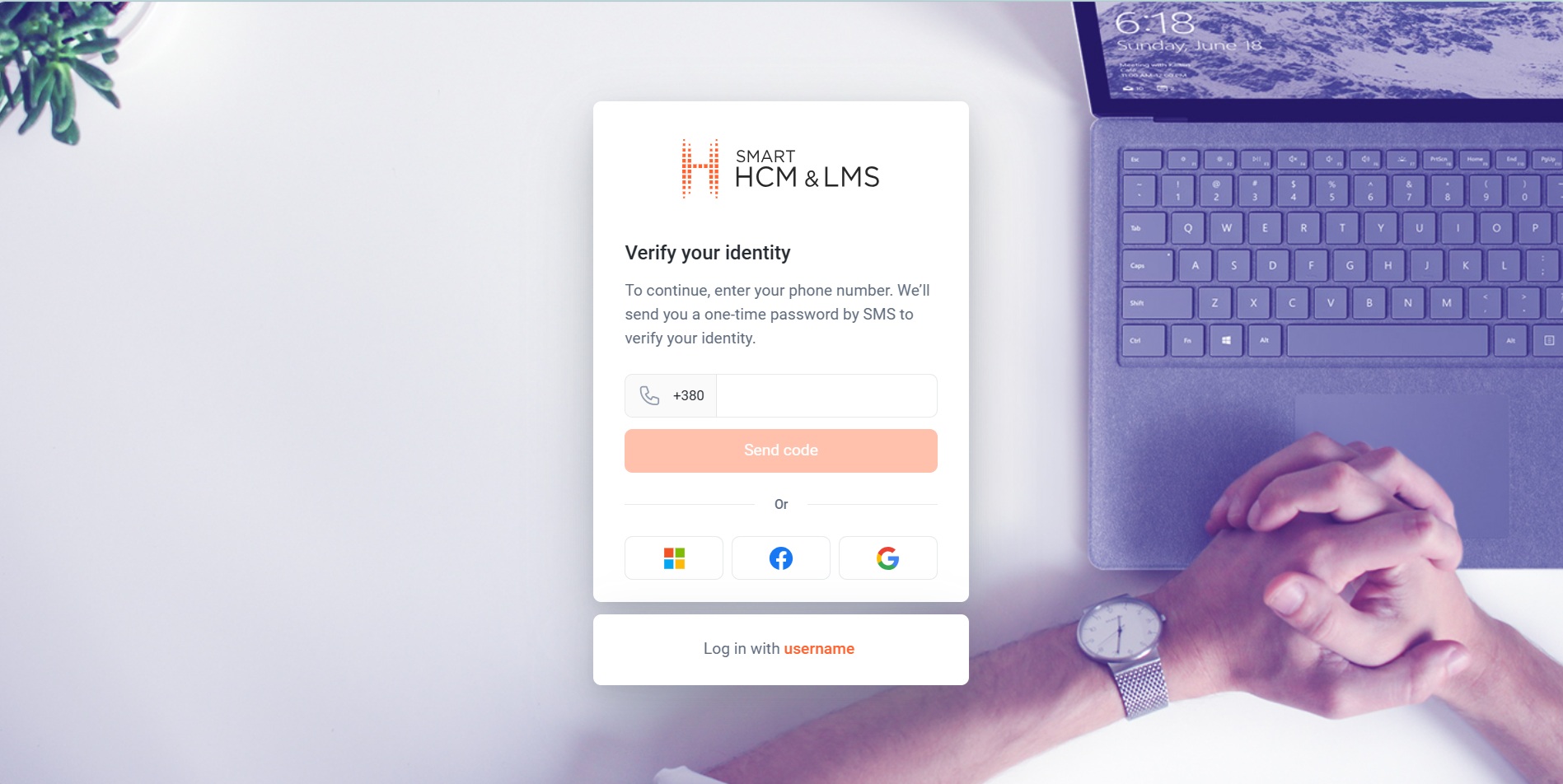
After successful validation, the system sends a one-time verification code via SMS.
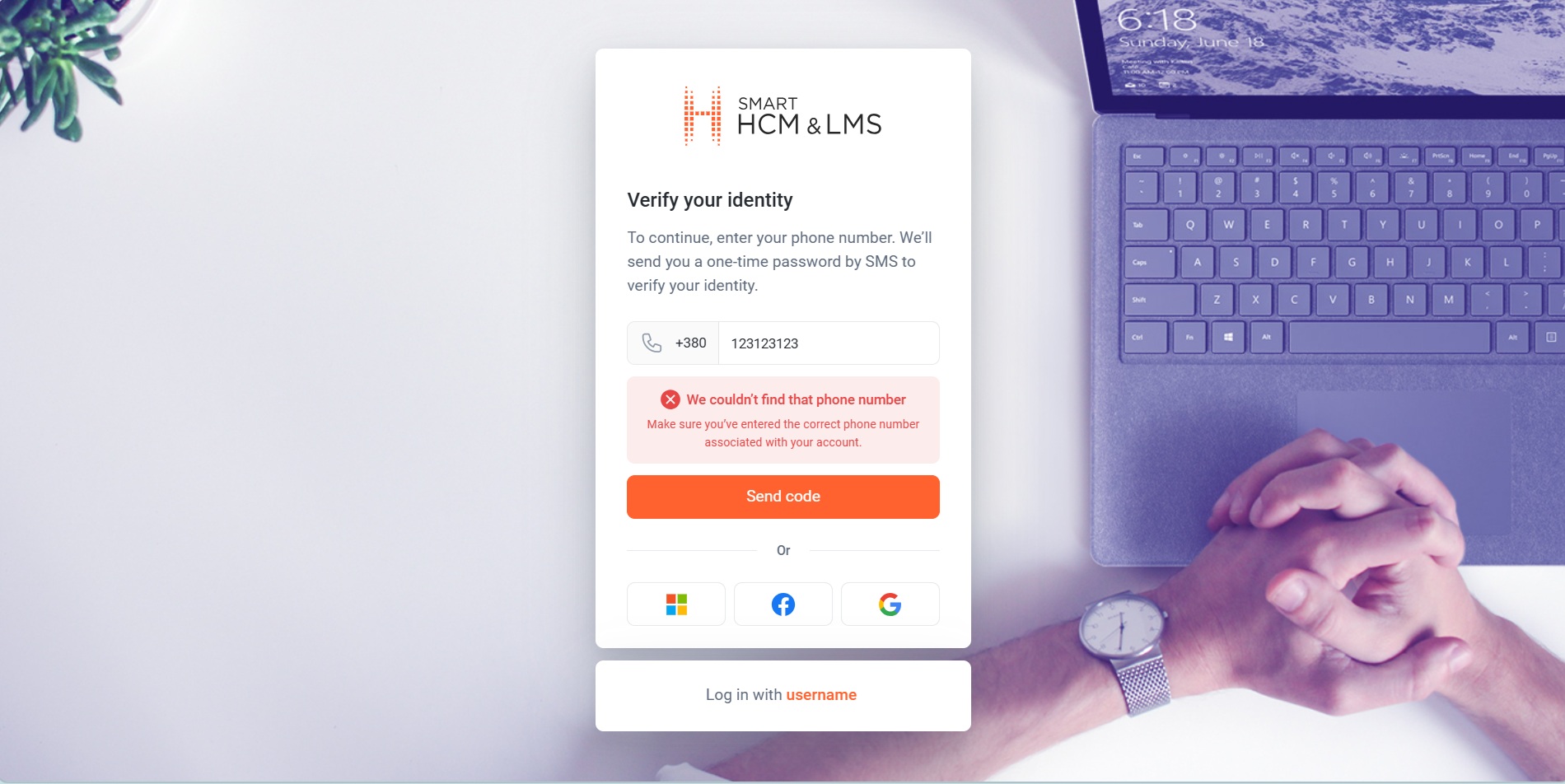
• Secure phone number validation
Before sending a verification code, the system automatically validates the entered phone number.
The validation process confirms that:
- the phone number exists in the system;
- the phone number is associated with a Portal user;
- SMS authentication is allowed for the contact;
- the entered number follows the correct format.
If validation fails, users receive clear guidance explaining why authentication cannot continue.
This helps users quickly identify and resolve common login issues.
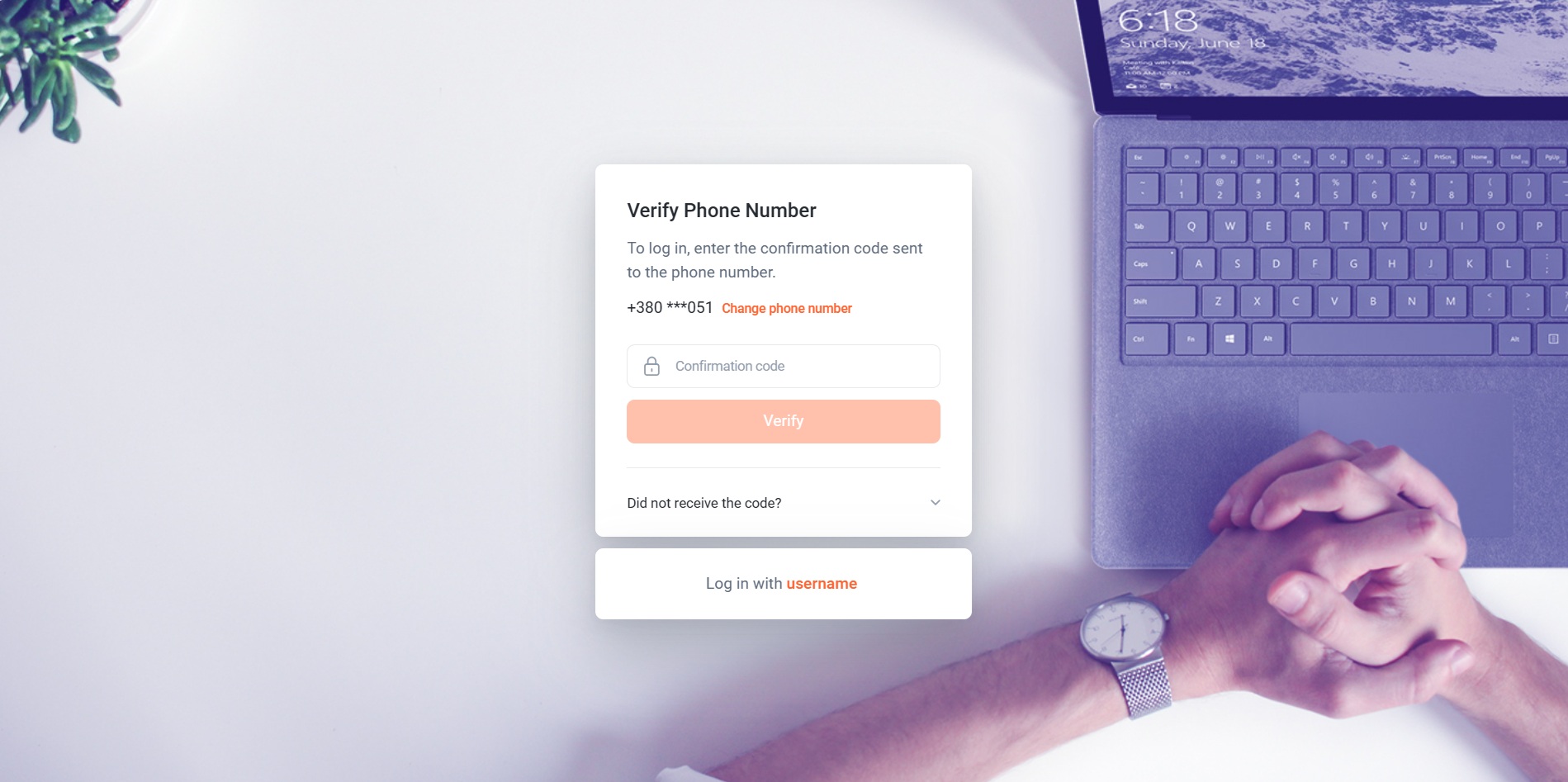
• One-time password verification
After the verification code is sent, the user is redirected to the confirmation screen.
For security reasons, the phone number is displayed in a masked format.
Users enter the received code and click Confirm.
On supported mobile devices, the verification code may be detected and populated automatically, reducing the time required to complete authentication.
• Intelligent security controls
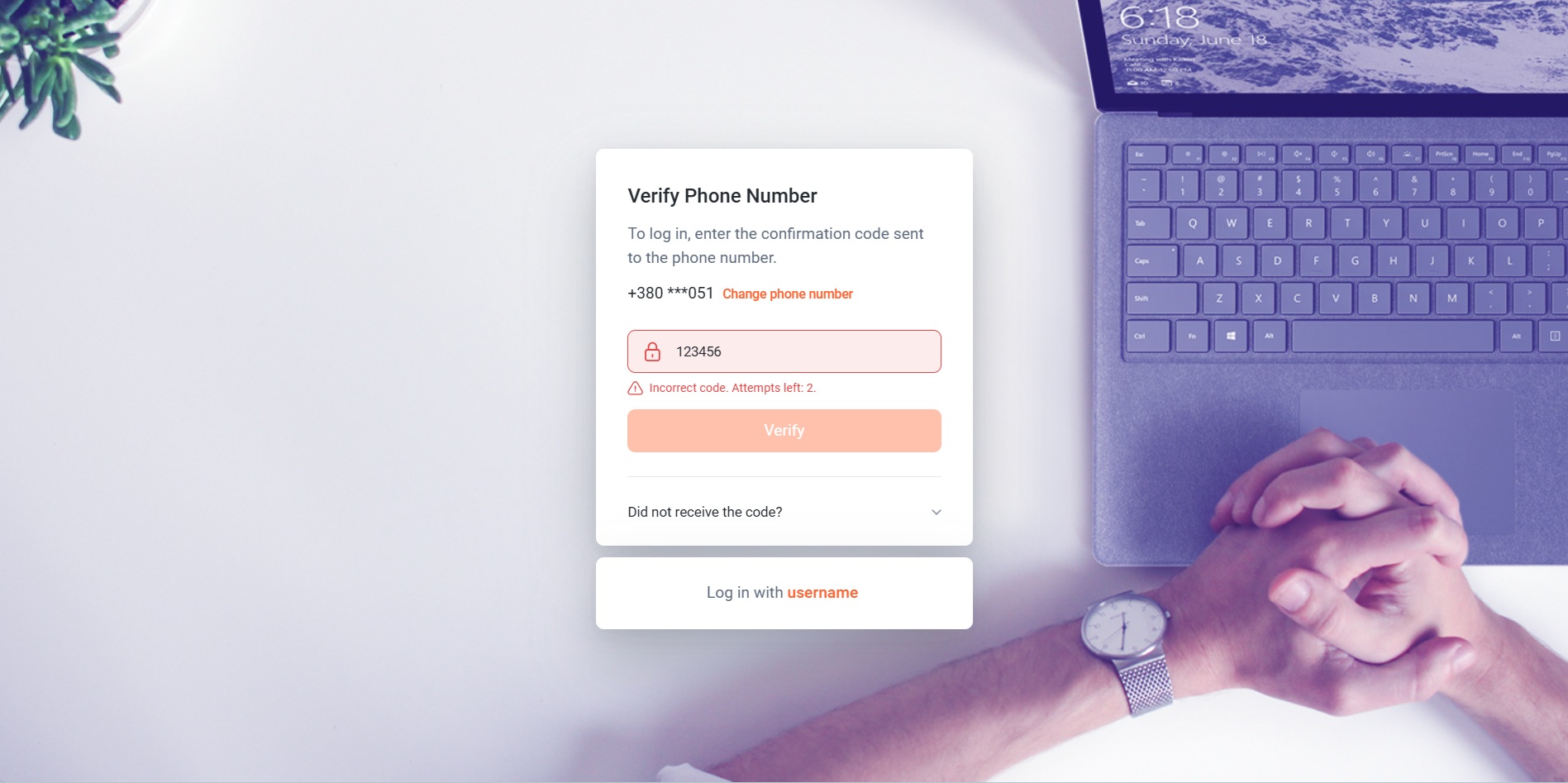
The solution includes several built-in protection mechanisms designed to prevent unauthorized access.
- Verification code expiration
- Limited verification attempts
- Controlled code resending
Who will benefit?
• Employees
For quick access to the self-service portal without remembering passwords or performing password resets.
• HR Departments
For reducing support requests related to forgotten passwords and login issues.
• IT and Security Teams
For introducing additional authentication controls while simplifying the user experience.
• Organizations with Mobile Workforces
For enabling secure access from smartphones and personal devices without requiring complex password management.
Why is it convenient?
✓ Passwordless access
Users can sign in without creating, remembering, or resetting a password.
✓ Faster authentication
The login process requires only a phone number and a verification code.
✓ Improved security
One-time passwords expire automatically and cannot be reused.
✓ Protection against unauthorized access
Code expiration, retry limits, and resend restrictions reduce the risk of abuse.
✓ User-friendly experience
Verification codes may be automatically detected on supported devices.
✓ Works across mobile and desktop devices
The same authentication flow can be used from any supported platform.
Additional feature capabilities
- One-time password via Phone Number authentication
- Passwordless login experience
- Mobile phone verification
- Automatic validation of registered phone numbers
- Code expiration management
- Verification attempt tracking
- SMS resend controls
- Automatic code detection on supported devices
Why is this important?
Traditional password-based authentication often creates friction for users and generates additional support workload for administrators. Forgotten passwords, password resets, and weak credential practices can negatively affect both user experience and security.
The new One-time password via Phone Number Authentication mechanism addresses these challenges by replacing permanent credentials with short-lived verification codes tied to a validated mobile phone number.
By combining passwordless access, identity verification, attempt control, code expiration, and SMS-based confirmation, the solution provides a modern and secure authentication experience while reducing administrative effort and improving user adoption.
In short: users gain faster and more convenient access to the self-service portal, while organizations benefit from stronger authentication controls and lower password management overhead.
AI-Powered Content Translation: One Record, Every Language
What has been delivered?
A new AI-Powered Translation Framework has been introduced to simplify multilingual content management across SMART HCM & LMS.
The solution allows administrators to maintain multilingual content within a single business record instead of creating separate records for each language. Instead of creating separate records for each language, translations are stored centrally and automatically displayed to users according to their language settings.
The enhancement introduces a dedicated Translations tab available on supported business objects throughout the platform. The tab provides a structured translation workspace, displays all configured system languages, and includes built-in AI translation capabilities.
The framework supports a wide range of business areas, including:
- Jobs and Job Profiles;
- Benefits;
- Competencies and Skills;
- Absence Reasons;
- Development Methods;
- Corporate Events;
- Recruiting Dictionaries;
- Shop Products;
- Recognition and Gamification content;
- and many other portal-facing objects.
This approach significantly reduces administrative effort while ensuring a consistent multilingual user experience.
How does it work?
• Centralized translation management
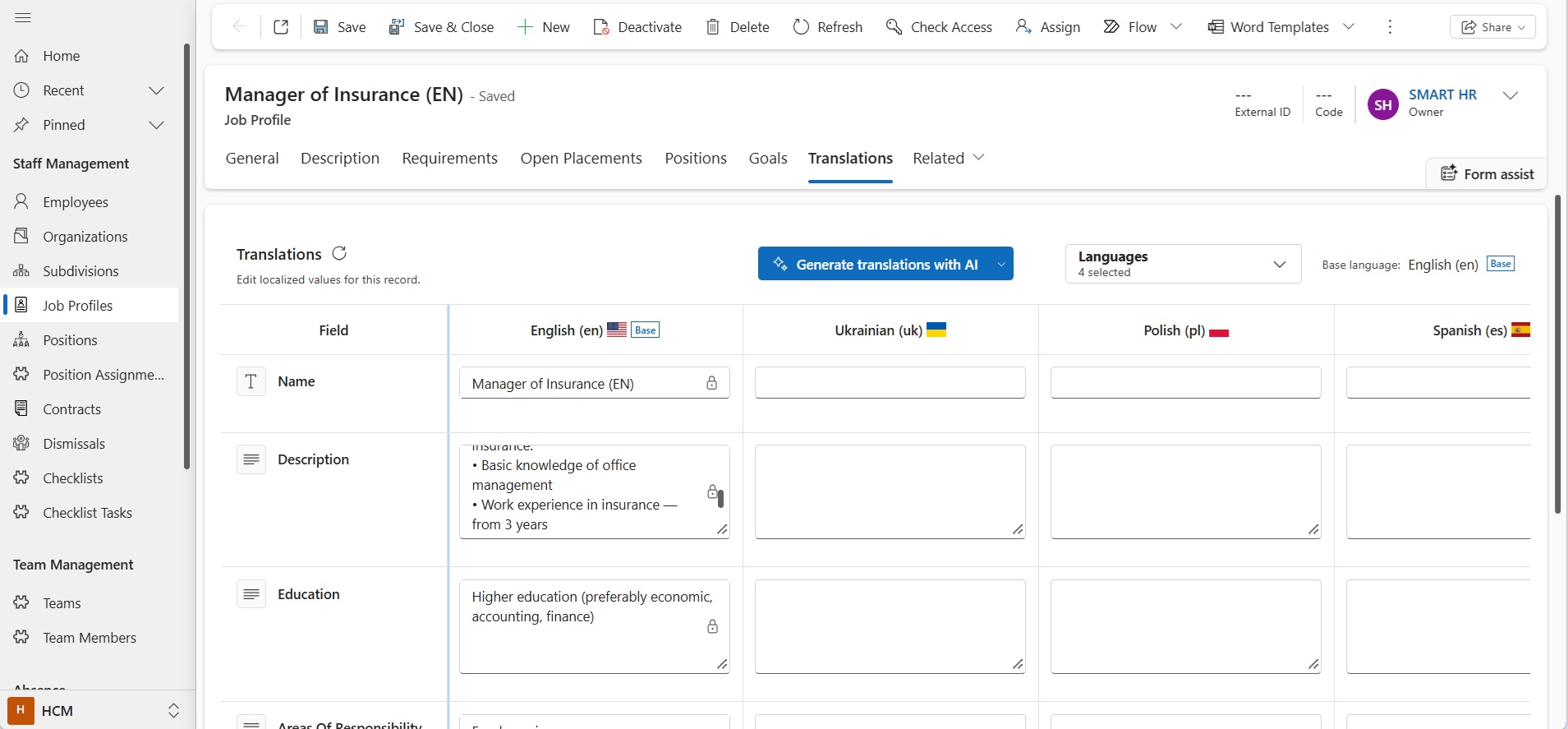
Every supported record now contains a dedicated Translations tab where all language versions are maintained.
The translation screen presents:
- translatable fields as rows;
- available languages as columns;
- a designated base language used as the source for translation generation.
Administrators can manage all language versions from one place while maintaining only a single business object.
For example, a Benefit, Job Profile, Development Method, or Competency exists as one record regardless of how many languages are supported within the organization.
• AI-generated translations
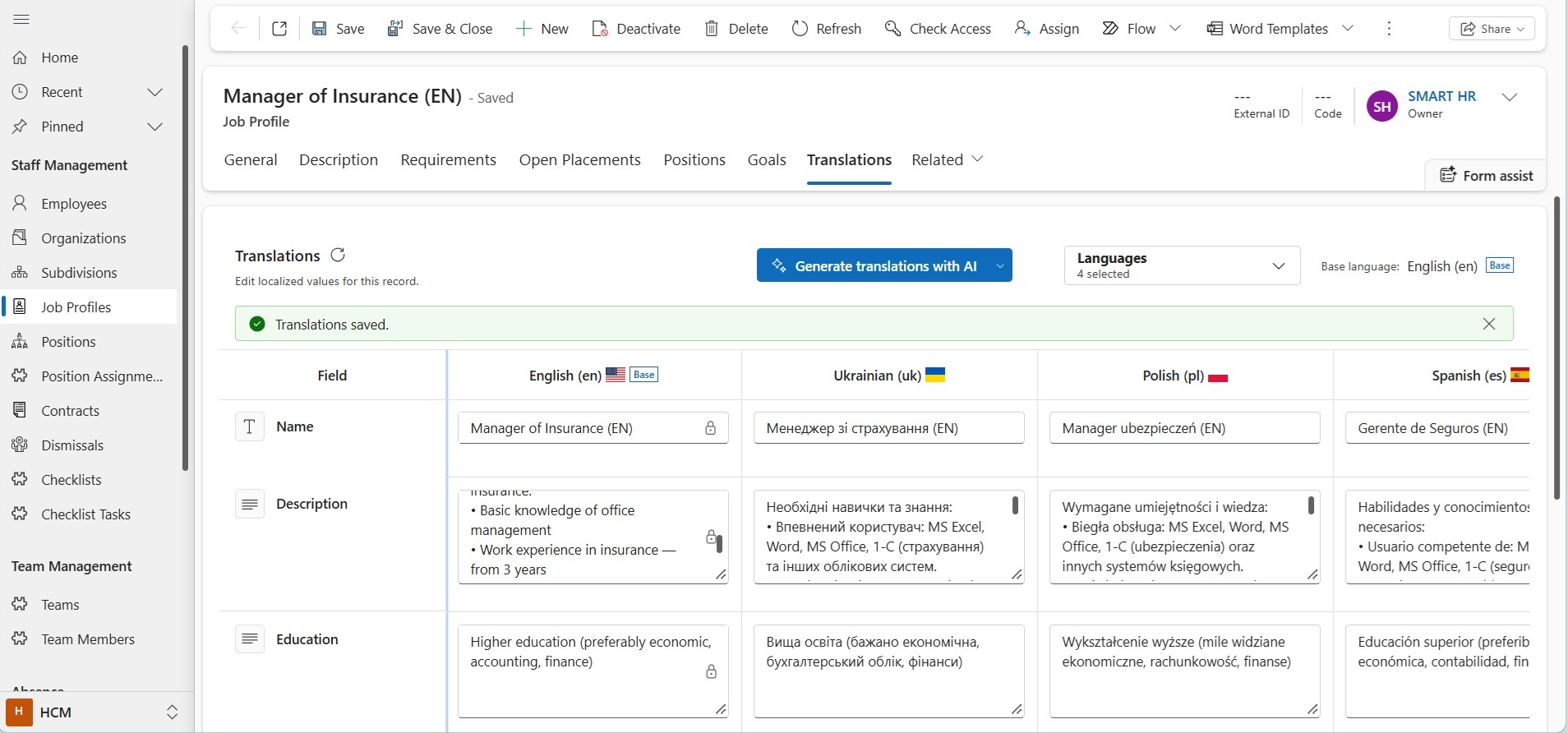
To accelerate content localization, the system provides a built-in Generate Translations with AI function.
The AI engine automatically translates content from the base language into selected target languages configured for the system.
Generated translations can then be reviewed, adjusted, and approved before being saved.
This dramatically reduces the effort required to maintain multilingual content across hundreds or thousands of records.
• Two translation modes
Administrators can choose between two translation strategies depending on the situation.
Generate empty values only – this option translates only fields that do not yet contain a translation. Existing translations remain unchanged.
Typical use cases:
- a new language was added to the system;
- some translations were completed manually and should be preserved.
This option helps enrich existing content without overwriting previously reviewed translations.
Regenerate all values – this option generates translations for all selected languages and replaces existing translated values.
Typical use cases:
- source content has changed significantly;
- translations require a full refresh.
This allows administrators to quickly synchronize all language versions with the current source content.
• Human review and editing
AI translations are fully editable.
Administrators can:
- review generated translations;
- correct terminology;
- apply company-specific wording;
- align language with internal standards.
The final content always remains under human control.
This combination of automated generation and manual validation provides both efficiency and quality.
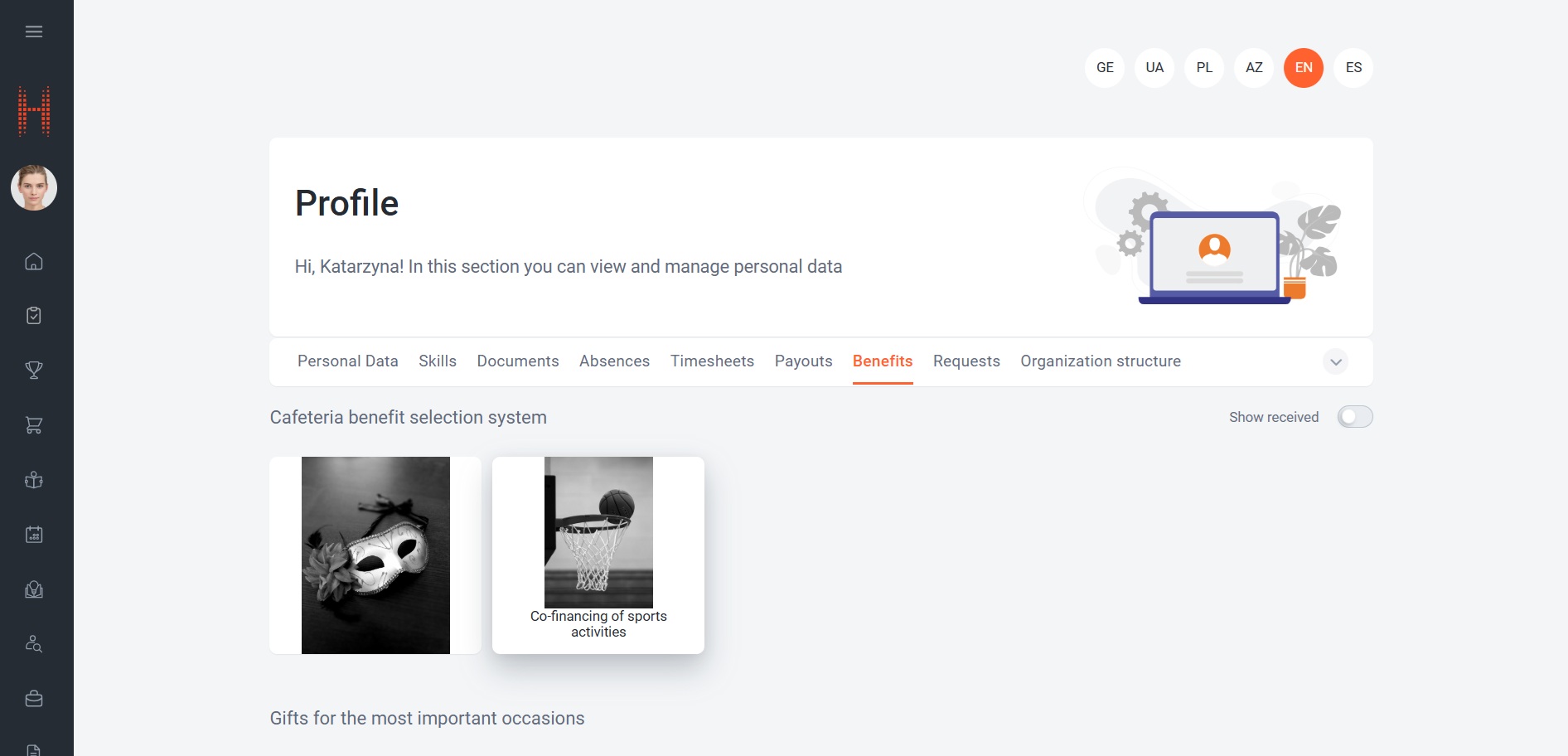
• Language-specific portal experience
Portal users automatically see content in the language selected within their personal settings.
For example, the same Benefit record may be displayed differently depending on user preferences:
- English user → English translation;
- Ukrainian user → Ukrainian translation;
- Polish user → Polish translation;
- Spanish user → Spanish translation.
No duplicate records are required.
The platform automatically selects the appropriate translation and displays it consistently throughout the Portal.
• Flexible language management
The list of available translations is based on the organization’s Language Dictionary.
Administrators can choose which languages should be maintained for a specific record.
This means organizations are not required to translate content into every supported system language and can focus only on languages actively used by their employees.
• Broad platform coverage
The translation framework is available across numerous business areas, enabling organizations to localize much more than simple labels.
Examples include:
- job descriptions;
- responsibilities and job tasks;
- benefit descriptions;
- absence reasons;
- competencies and behavioral indicators;
- learning courses and learning paths;
- corporate events;
- recognition programs;
- development plans.
This creates a consistent multilingual experience throughout the employee lifecycle.
Who will benefit?
• HR Administrators
For maintaining multilingual content without creating duplicate records.
• Global Organizations
For supporting employees across different countries and languages from a single platform.
• Talent Management Teams
For maintaining competency frameworks, job architectures, and career development content in multiple languages.
• Employee Experience Teams
For delivering benefits, recognition programs, events, and communications in employees’ preferred language.
Why is it convenient?
✓ One record, multiple languages
Maintain a single business object regardless of the number of supported languages.
✓ AI-accelerated localization
Generate translations automatically instead of translating content manually.
✓ Human-controlled accuracy
Review and edit AI-generated content before publication.
✓ Portal language awareness
Users automatically see information in their preferred language.
✓ Consistent multilingual experience
The same localization framework works across numerous modules and business processes.
✓ Reduced maintenance effort
Update one record instead of maintaining multiple language-specific versions.
✓ Scalable global deployment
Support new countries and languages without redesigning content structures.
Additional feature capabilities
- Dedicated Translations tab on supported entities
- AI-generated translations
- Translation generation for all configured system languages
- Two AI translation modes
- Translation editing and review
- Base language management
- Automatic portal localization
- Centralized multilingual content storage
- Organization-wide localization framework
- Support for dozens of business entities
- Elimination of duplicate language-specific records
Why is this important?
As organizations grow internationally, multilingual content quickly becomes difficult to manage. Maintaining separate records for each language increases administrative effort, creates inconsistencies, and makes ongoing updates difficult.
The new AI-Powered Translation Framework replaces this fragmented approach with centralized multilingual content management.
By combining AI-generated translations, manual review capabilities, and automatic language-specific display on the Portal, the solution enables organizations to deliver a localized employee experience while maintaining only a single source of truth.
In short: administrators create and maintain one record, AI helps generate translations, and employees automatically receive information in their preferred language, resulting in greater consistency, lower maintenance costs, and a significantly improved global user experience.
Documents: Easy Access to Applicant and Employee Documents
What has been delivered?
A new Documents page has been added to the Portal, giving users direct access to documents related to Applicants and Contacts.
Previously, documents were managed primarily within the administration area. The new Portal experience introduces a more convenient and user-friendly way to work with recruiting and employee documents, allowing users to access files directly from Applicant and Contact profiles.
The new functionality provides:
- quick access to documents from Applicant and Contact forms;
- structured document organization;
- online document preview;
- file download;
- file upload;
- document grouping by type;
- simplified document lifecycle management.
This enhancement significantly improves the user experience when working with recruiting and employee documentation.
How does it work?
• Direct access from Applicant and Contact profiles
A new Documents section can be opened directly from Applicant, Contact, or Contract forms using the Documents action available in the command bar.
All documents associated with the selected Applicant or Contact are available from a single location.
This allows recruiters and HR specialists to access necessary files within the context of the person they are working with.
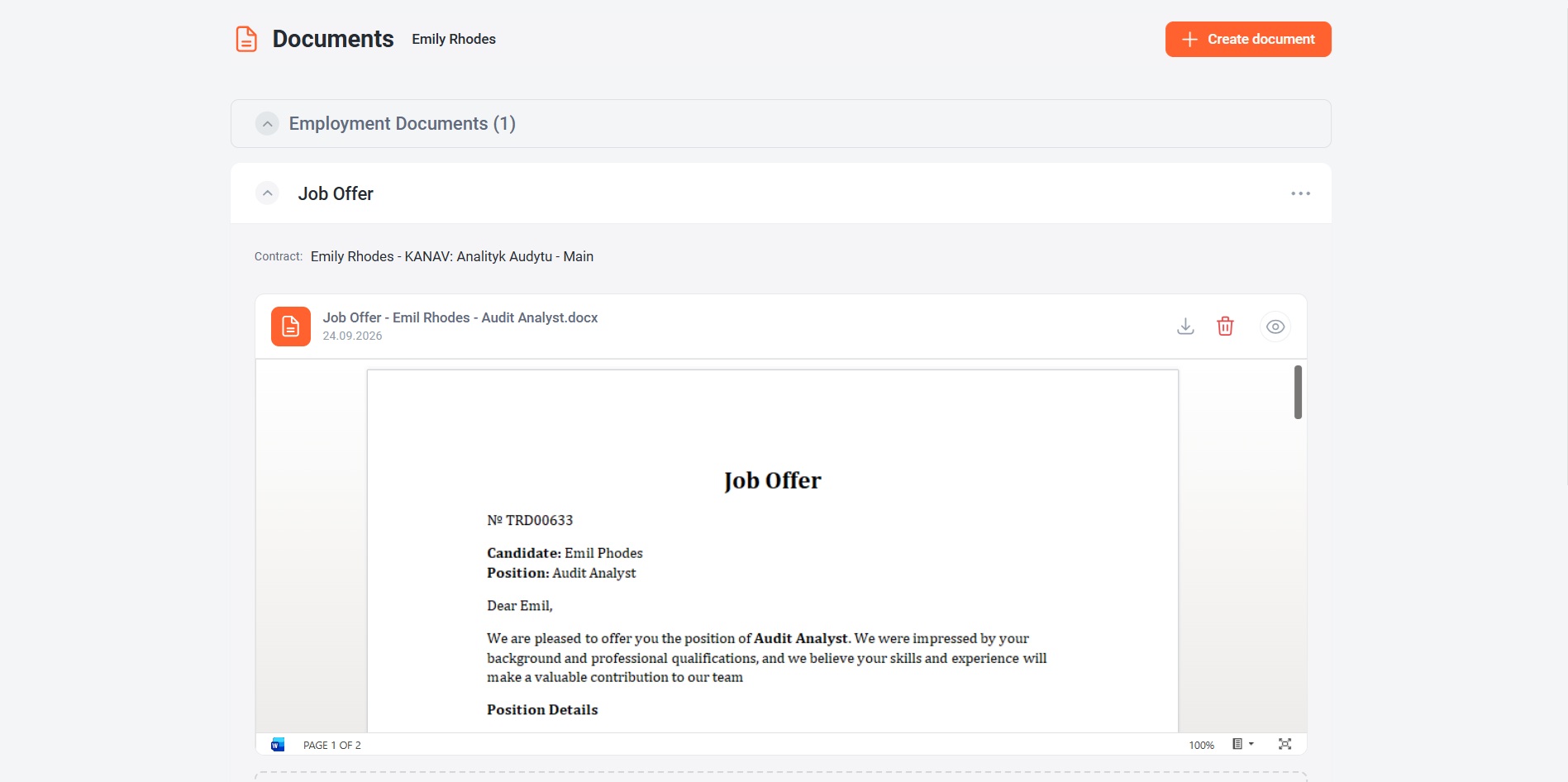
• Structured document organization
Documents are displayed as document cards grouped by document type.
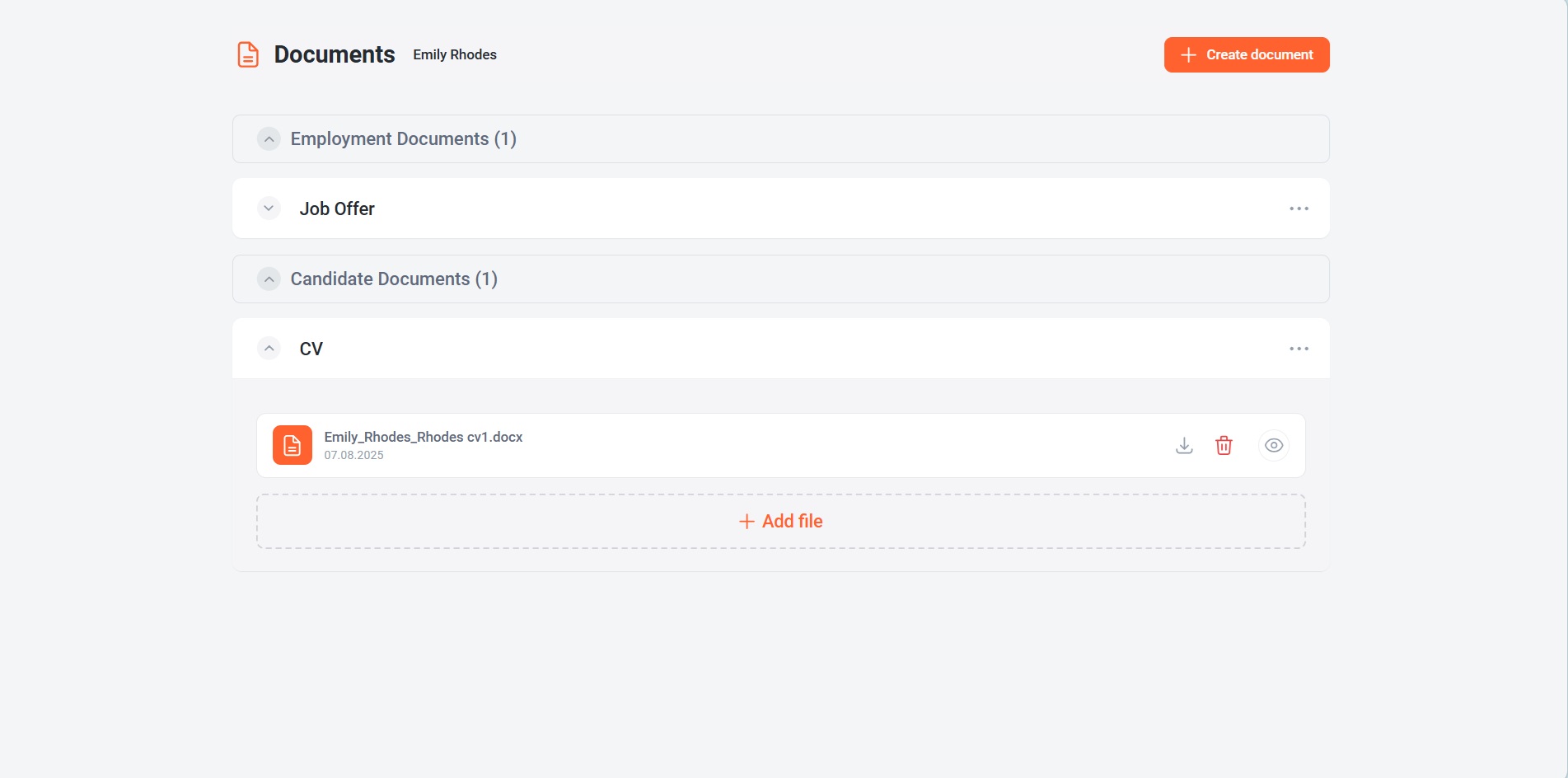
This structure makes it easier to navigate through large document collections and quickly locate the required files.
Instead of browsing through attachments and records, users can immediately identify document categories and access relevant documents.
• Built-in document preview
One of the key improvements is the ability to preview documents directly on the Portal.
Users can open supported file types without downloading them first.
This allows recruiters and HR teams to review documents more quickly and decide whether downloading is necessary.
The preview functionality reduces the number of unnecessary downloads and creates a smoother user experience.
• File management from the Portal
Users can work with files directly from the document card:
- upload files;
- preview files;
- download files;
- delete files.
This eliminates the need to switch between multiple interfaces when maintaining employee or candidate documentation.
• Continuous document history from Candidate to Employee
The solution supports a seamless transition of documents throughout the hiring process.
Documents initially created for an Applicant remain available after the Applicant becomes an Employee. This ensures that recruiting and employment-related documentation is preserved in a single continuous history.
As a result, users can access the complete document history regardless of whether the document originated during recruitment or after employment.
Who will benefit?
• Recruiters
For faster access to CVs, offers, onboarding documents, and other recruitment-related files.
• HR Specialists
For convenient management of employee documents directly from employee profiles.
Why is it convenient?
✓ Documents are available directly on the Portal
Users can work with documents without opening the administration interface.
✓ Access documents from Applicant and Contact records
Documents are available exactly where users expect to find them.
✓ Built-in document preview
Review files before downloading them.
✓ Less navigation
Everything is available from one screen.
✓ Document continuity across the hiring journey
Document history continuity between Applicants and Employees after hiring.
Additional feature capabilities
- Documents page on the Portal
- Candidate document access
- Contact document access
- Online document preview
- File upload
- File download
- File deletion
- Document grouping by type
- Continuous Applicant-to-Employee document history
Why is this important?
Recruiters and HR teams frequently work with employment offers, CVs, certificates, contracts, onboarding documents, and other files associated with candidates and employees. When those documents are available only through administrative records, finding and reviewing information becomes time-consuming.
The new Documents page brings document management closer to the business process by making files available directly from Applicant and Contact profiles. With document grouping, preview functionality, and simplified file management, users can access information faster and work more efficiently.
In short: documents are now available directly on the Portal, providing recruiters and HR specialists with faster access, document preview capabilities, and a more convenient user experience.