At a certain stage of growth, managing people becomes a structural challenge — not merely a functional one.
Teams evolve faster than they are documented. Roles become inconsistent across departments. Recruitment slows down at the entry point. And it becomes increasingly difficult to keep track of who is responsible for what, and what actually needs to be done.
This is the point at which complexity in people management begins to turn into genuine organizational risk.
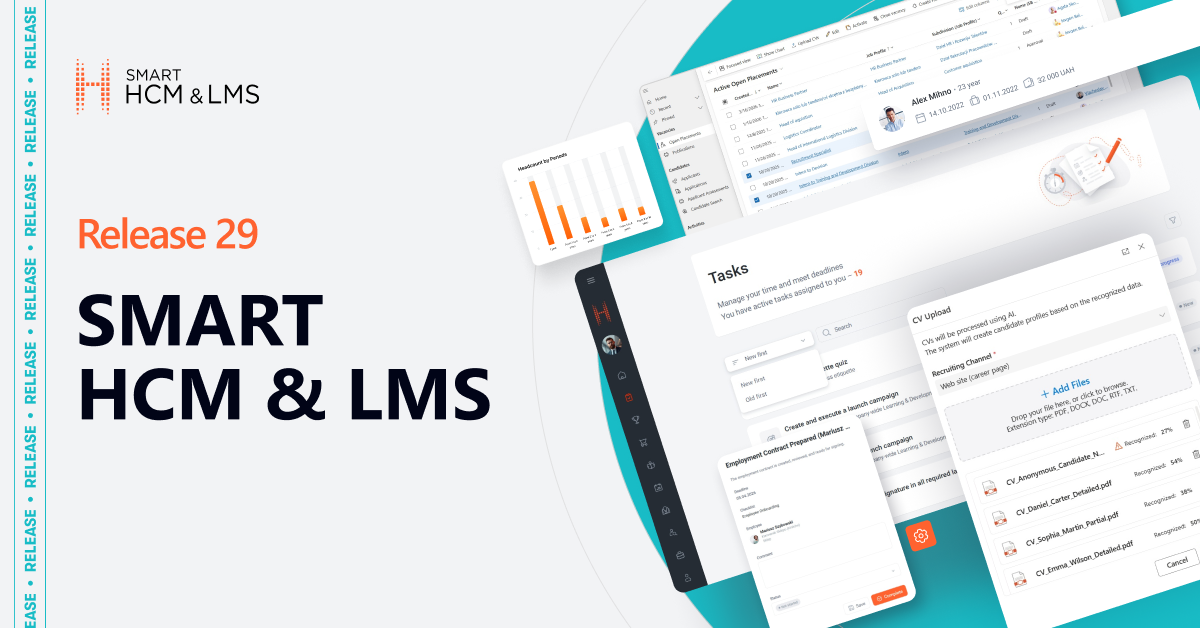
SMART HCM & LMS Release 29 — Teams, Roles & Execution is designed specifically for this stage of growth.
This release introduces a deeper level of control across three critical layers of people management:
· Structured and consistent team and role management
· Faster, automated conversion of CVs into structured candidate profiles
· A unified view of employee tasks and responsibilities
Together, these updates create a system where team structures are always up to date, roles are clearly defined, and execution is fully visible.
As organizations scale, effective people management is no longer about isolated processes — it’s about continuously aligning teams, roles, and responsibilities in real time.
Team Management: A Unified Framework for Structuring Teams and Roles
What has been delivered?
A new Team Management functionality allows companies to structure, manage, and evolve their teams with improved clarity, consistency and flexibility.The new functionality supports the entire lifecycle of team administration — from team creation and role assignment to tracking participation periods. The module also introduces structured leadership rules (only one active team leader at a time) and includes a set of predefined system roles such as Administrative Manager, Functional Manager, Mentor, and HR Business Partner.
This enhancement establishes a central place within the system where team compositions can be managed transparently and consistently, in alignment with real‑world team structures and role models.
How does it work?
• Centralized role area
All available roles are managed centrally in the administrative interface.This ensures:
- consistent use of role naming across all teams
- easier governance for HR and Competence Centers
This becomes a single source of truth for all role definitions across the organization.

• Creating and managing teams
HR Administrators can easily create new teams, edit existing structures, archive teams, and update members at any time.

• Assigning team roles
Each team member can be assigned one or multiple roles simultaneously (e.g., Team Lead, Backend Developer, Scrum Master, Architect, Coordinator).Roles can be fully aligned with the company’s internal role architecture, ensuring consistency and clarity across all teams.

• Unambiguous leadership
The system ensures unambiguous leadership by allowing only one active team leader at a time, providing clarity and accountability within the team.

• Tracking participation periods
The module records the start and end dates of each member’s participation in a team.
Who will benefit?
• HR departments
For structured workforce management, transparent team composition tracking, and maintaining accurate records.
• Project and delivery managers
For quick access to information on team members, their roles, participation start dates, and how the team has evolved over time.
Why is it convenient?
✓ Clear visibility of team structures
Teams become transparent, with roles and participation periods always up to date.
✓ Supports real-life team dynamics
Employees can hold several roles at once — just like in real delivery environments.
✓ Consistent role definitions across the organization
A centralized role directory ensures that all teams speak the same “role language.”
✓ Clear team leadership
Ensures clear and unambiguous leadership by allowing only one active team leader at a time.
Additional options of the feature
- Supports an unlimited number of roles per team member
- Enables management of multiple active teams within the organization
- Provides flexible team composition suitable for Agile, matrix, and cross-functional models
- Prevents duplicate role names for clean, consistent, and reliable role structure
- Includes a predefined set of roles — such as Administrative Manager, Administrative +1, Functional Manager, Mentor, and HR Business Partner — available out of the box
Why is this important?
The new Team Management module allows organizations to maintain an accurate, up-to-date, and transparent structure of teams. It supports modern delivery models, enables better planning, and eliminates manual overhead.For companies with dynamic teams, changing project needs, or multiple delivery streams, this module becomes a foundational tool that ensures:
- more structured management
- better visibility into people and roles
In short: it brings structure, transparency, and operational clarity to one of your most critical assets — your people and the teams they form.
AI-Powered Smart CV Import: From Uploaded CV to Applicant Profile
What has been delivered?
A new AI-powered Smart CV Import functionality reduces early-stage recruitment time and significantly accelerates and simplifies the process of adding applicants to the system.Instead of manually creating profiles and entering data, recruiters can now upload multiple CVs at once. The system automatically extracts key information, recognizes candidate details, detects duplicates, and generates applicant profiles and applications. AI is used for data extraction only, not for decision-making.
This enhancement transforms how talent acquisition teams work by reducing repetitive manual tasks, increasing accuracy, and ensuring that candidate data is processed faster and more consistently across the organization.
How does it work?
• Launching the import
Recruiters can initiate the CV import from:
- Open Placements
- Applicants
- Hiring Projects
The upload action is available through a dedicated Upload CV command in the administrative interface.


• Selecting a recruitment channel
Before uploading files, the user selects a recruitment channel from the list of active channels.The selected channel is then automatically used when creating applicant profiles and applications.

• Uploading CV files
Users can:
- drag and drop files into the upload area, or
- select files via the file manager
Supported file types: PDF, DOCX, DOC, RTF, TXTMaximum: 10 files per import session
If a file format is not supported or the limit is exceeded, the system displays a clear, descriptive error message.
• AI-driven document recognition
As soon as the files are uploaded, the system automatically starts processing each document.
Statuses displayed:
- Recognition — AI is extracting candidate information
- Recognized — data successfully captured
- Error — recognition failed (user can retry or remove the file)
If the system cannot identify an email or phone number, a warning is displayed; however, this does not block further processing.


• Percentage of recognized attributes
Each recognized file displays the % of extracted attributes.This helps recruiters instantly understand whether the CV is complete or requires manual review.
• Applicant creation and automated deduplication
After recognition, the user confirms the import.The system then:
- creates Applicant records
- creates Application (if the import is initiated from Open Placements or Hiring Projects)
- runs duplicate detection to prevent duplicate profiles and automatically links to existing applicants when matches are found
• Automated population of fields
Applicant fields filled automatically:
- Original Recruiting Channel
- Personal details recognized from the CV
Application fields filled automatically:
- Open Placement / Hiring Project
- Applicant
- Recruiting Channel
- Received On
A document record with CV type is created.
• Notifications
Upon completion, the user receives a detailed message allowing recruiters to review errors immediately.

Who will benefit?
• Recruiters
For fast import of multiple resumes, reduced manual work, and higher data quality.
• Hiring managers
For quicker access to structured applicants’ profiles created without delays.
• Companies with high recruitment volume
For eliminating manual data entry and speeding up applicant pipeline creation.
Why is it convenient?
✓ Fast and low-touch — upload CVs in seconds and let AI handle the rest.
✓ Multiple formats supported, reducing delays caused by inconsistent file types.
✓ Automatic deduplication ensures clean and accurate applicant records.
✓ One-click creation of applicants and applications.
✓ Transparent processing statuses and data quality insights.
✓ Error handling built-in — invalid files, missing contacts, or failed recognition are clearly flagged.
This functionality dramatically reduces manual workload and streamlines the entire early-stage candidate processing flow.
Additional options of the feature
• Ability to import up to 10 CVs at once
• Support for multiple document formats
• Warning for missing contact information
• Ability to cancel or retry recognition for individual files
• Automatic assignment of recruitment channel
• Synced behavior across Open Placements, Applicants, and Hiring Projects
Why is this important?
Smart CV Import allows companies to accelerate the earliest and most time-consuming part of the recruitment process — converting raw CVs into structured applicant profiles.This results in:
- significantly faster applicant processing
- consistent and reliable data
- elimination of manual entry
- improved recruiter productivity
- higher accuracy in applicant profiles
- streamlined workflows across all recruitment operations
In short: it helps teams move from CVs to structured talent data in seconds, not minutes — with maximum accuracy and minimum effort.
Task Manager: A Centralized View of All User Tasks Across the Portal
What has been delivered?
A new Tasks section on the Self-Service Portal solves one of the biggest portal pain points — tasks scattered across multiple modules without a unified view.
Instead of navigating through separate modules or business processes, users now see every task in one place, with clear deadlines, priorities, and context.
This new functionality transforms how employees interact with the portal by giving them a single point of control for managing tasks, requests, learning, events, and any other activity requiring action.It dramatically improves visibility, reduces missed deadlines, and supports more efficient day-to-day task execution.
How does it work?
• Centralized aggregation of tasks
The system automatically collects all tasks assigned to a user — regardless of which module or business process created them — and displays them in a single unified interface on the portal.

Tasks may include:
- approval requests
- assessment applications
- goal tasks
- individual development plan actions
- learning assignments
- quizzes and surveys
- checklist activities
- other actionable items assigned across HR or business processes
Only tasks with a defined due date appear in the Tasks section to ensure clarity and prioritization.
• Clear visual identification of task origin
Each task includes a visual indicator of the module it belongs to (e.g., Learning, Goals, Approvals).Users immediately understand the context and purpose of a task without having to open it. This minimizes confusion and helps users understand the context before opening the task.
• Sorting and prioritization
Tasks are automatically sorted by due date — from the nearest to the most distant — enabling employees to focus on what requires immediate attention.
Users can also sort tasks manually based on their preferences.

• Advanced search and filtering
The Tasks section includes powerful ways to navigate large task lists:
- Search bar to find a specific task by name
- Sort by due date — nearest first or latest first
- Filter by Category (e.g., Goals, Assessments, Learning, Approvals)
- Filter by date of execution:
- Overdue
- Tomorrow
- Next 7 days
- Next 30 days

• Task details at a glance
Each task includes name, category, due date, link to the task, and task status.
Users can access and complete tasks directly from the centralized interface.
• Easy navigation from multiple entry points
Users can access their tasks both from the Tasks to complete widget on the home page and from the dedicated Taskssection on the portal.When a user clicks on a task, the system automatically redirects them to the corresponding module or business process where the task can be completed.
• Checklist tasks
Checklist tasks assigned to the user now appear in the Tasks section.Users can update statuses, add comments, and mark tasks as completed directly on the Self-Service Portal.

Who will benefit?
• All employees
For immediate visibility into everything they need to do, in one place, without searching across modules.
• HR teams
For higher task completion accuracy.
• Organizations with multiple HR processes
For eliminating fragmentation and ensuring a unified, consistent user experience across the entire portal.
Why is it convenient?
✓ A single location for all tasks — no more navigating through multiple sections of the portal.
✓ Clear deadlines help users prioritize and stay on track.
✓ Visual indicators clarify which category each task belongs to.
✓ Sorting and filtering make even large task lists easy to manage.
✓ Search allows instant access to any task.
✓ Consistent user experience across processes.
✓ Eliminates missed deadlines by keeping upcoming tasks always visible.
✓ Direct navigation to the right process — clicking a task redirects the user directly to the relevant module for completion.
✓ Checklist items can be completed directly on the portal — employees can update statuses and finish required actions without leaving the Tasks section.
This functionality supports employees in managing their daily work more efficiently and reduces the frustration associated with scattered tasks.
Additional options of the feature
• Automatic aggregation of all tasks with due dates
• Support for tasks from all HR and operational business processes
• Visual category markers for task origin
• Sorting, searching, and filtering capabilities
• Clickthrough access to any task from the unified interface
• Synchronization with underlying modules
Why is this important?
The new Tasks section helps organizations significantly improve task management and employee productivity by offering:
- complete visibility into all assigned tasks
- reduced delays and missed deadlines
- increased engagement in HR, learning, and operational processes
- a unified experience instead of fragmented module-based navigation
- better planning and workflow organization for every employee
In short: it brings clarity, structure, and simplicity to the everyday user experience — ensuring that employees always know what needs to be done, when, and where.
With the Release 29 , SMART HCM & LMS strengthens its role as a system designed not just to support HR processes, but to bring structure and control to how organizations manage people at scale.
By connecting teams, roles, and execution in one environment, it enables HR and business leaders to operate with clarity, consistency, and confidence.
Because when structure is clear, roles are defined, and execution is visible — people management becomes predictable, scalable, and truly effective.